Attestations
What an attestation campaign is, who receives it, what the recipient does, and what happens to the answers.
An attestation is a person's confirmation, recorded with their name and the time, that they have read a policy and follow it, or that they have answered a short questionnaire. A campaign asks a whole group of people for that confirmation at once, with a due date, and collects the answers in one place.
People often ask: "What does the campaign do?" This page answers it in four parts: what a campaign is, who receives it, what the recipient does, and what happens to the results.
Role needed
What a campaign is
A campaign is a request to a defined group of people. You start it with Start attestation. It has:
- a title, for example "Annual code of conduct confirmation";
- a kind: confirm a policy, or answer a short questionnaire;
- a statement shown to the recipient;
- an optional due date;
- an audience: all people, or the people of the departments you choose.
When you open the campaign, the app creates one response per person in the audience. Each response starts as Pending. The campaign is Open until someone closes it.
There are two kinds.
| Kind | What the person does | Use it for |
|---|---|---|
| Confirm a policy | Reads an approved policy and confirms with "I confirm", or declines with a reason. | Code of conduct, information security policy, any policy people must acknowledge. |
| Answer a short questionnaire | Answers up to 15 questions in their own words. Every question must be answered to submit. | Annual conflict-of-interest declaration, a short check of awareness or practice. |
For a policy campaign you choose from the policies that are Approved. A Draft, In review or Retired policy is refused. The campaign records the Policy version that is confirmed. If you leave the statement empty, the app uses the sentence "I have read and understood this policy and I comply with it." You can replace it with your own wording. The sentence is stored in English, so enter your own text if your people work in another language.
Who receives it
You choose the audience when you start the campaign.
- No department chosen: everyone in your organization who does work receives it. That means members with the role Admin, Manager or Contributor. Auditors, Viewers and members with no module access do not receive it.
- One or more departments chosen: the Admin, Manager and Contributor members who are assigned to those departments, including their sub-departments, receive it. The head of a department receives it too if they have one of these roles.
- Individual people chosen: the people you tick under Individuals receive the campaign as well, with or without departments. You can pick Admin, Manager and Contributor members. A person the app does not know is refused. If you choose no department and no person, everyone who does work receives it.
If you name a department the app does not know, it refuses to open the campaign and names the department. It never widens the audience to everyone.
The audience is fixed when you open the campaign. Someone who joins your organization or moves department later is not added automatically. While the campaign is open, add them with Add people: the list shows members who are not in the campaign yet, and they get a task and reminders.
The app needs to know which department a person belongs to. Assign people to departments first, under Organization. See Organization and taxonomy. If nobody matches the audience, the app refuses to open the campaign and tells you to assign people to departments first.
What the recipient does
When the campaign opens, each person in the audience:
- gets a notification in the app and, by default, an email: "Please confirm: title", with the due date;
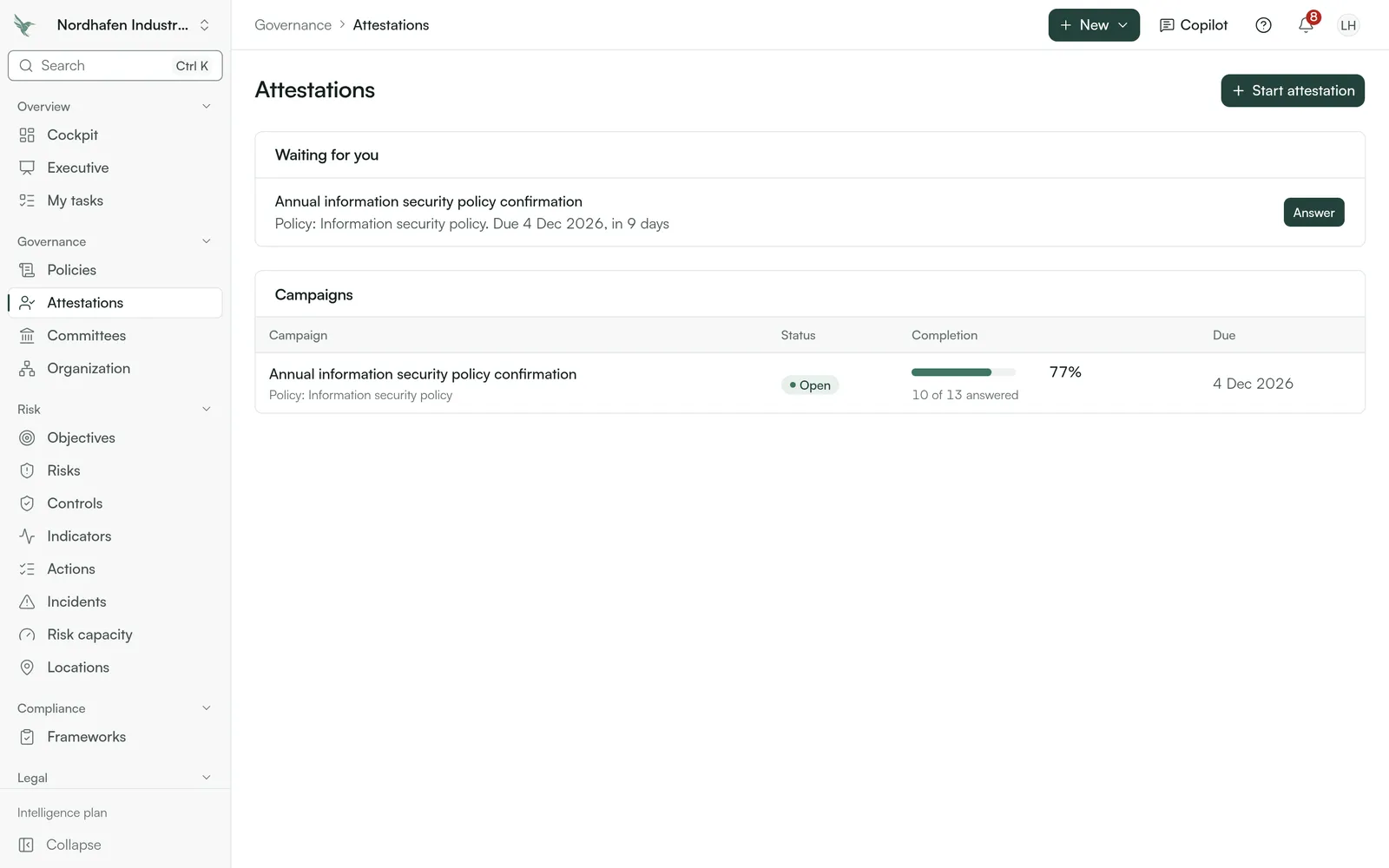
- sees the confirmation in My tasks as an Attestation, and in the panel Waiting for you at the top of the Attestations page;
- chooses Answer, which opens a side panel with the policy link, the statement and the questions;
- gives one of two answers.
| Answer | Needs |
|---|---|
| I confirm (for a questionnaire: Submit my answers) | For a questionnaire, an answer to every question. |
| I cannot confirm | A reason in Why not. |
Then they choose Send answer. The answer is recorded with their name and the time. Nothing is preselected: Send answer without a choice says "Choose an answer". A person can answer only once. They cannot change it afterwards, and they cannot answer after the campaign is closed. Under Your answers on the Attestations page they see what they answered and when. Only the person the confirmation is assigned to can answer it.
How reminders are sent for an attestation campaign
The app sends reminders to the people who have not answered a campaign. You do not have to chase them.
- Automatic reminders go out 7, 3 and 1 days before the due date, on the due date, and once more when the campaign becomes overdue. They go only to people who are still pending.
- You can send a reminder yourself at any time with Remind pending while the campaign is open. A person receives at most one manual reminder per hour.
- Reminders appear in the app. Whether a person also gets an email depends on their notification settings. By default, reminders are shown in the app only.
- Automatic reminders are produced by a background check that runs every 5 minutes, whether or not anybody opens the app. If a day was missed (for example after maintenance), the reminder for the next step is sent as soon as the check runs again.
A closed campaign sends no more reminders.
What happens to the results
This is the part people ask about most. The answers are evidence. The app keeps them and shows them in several places. It does not act on them by itself.
On the campaign page you see:
- the completion in percent, and the numbers Confirmed, Declined and Pending. Completion counts everyone who answered, whether they confirmed or declined;
- the share of answers By department;
- a table of Responses with the person, the department, the status, the time of the answer and the answers or the reason.
Start again. You can use a closed campaign as the template for the next round, for example the yearly repeat, with Start again.
Evidence export. Export evidence (CSV) downloads one row per person with the status, the time (UTC), the answers, the reason if declined and the note of whoever handled the decline (Handled note). You need the permission to export the audit log (Manager, Admin and Auditor). The export itself is written to the audit log.
Audit log. Opening a campaign, each answer ("Confirmed" or "Declined"), reminders, closing and the export are recorded.
Reports. Open campaigns appear in the compliance status report with how many people were asked, how many answered and the completion. The year-end pack lists every campaign of the year with the numbers for asked, confirmed, declined and pending. The second line view for the head of risk lists the open campaigns.
What does not happen automatically.
- A declined answer does not change the policy. The person who started the campaign does get a notification and a task "… declined". There they record a Note on how they handled it (for example the policy was explained or an exception was granted) and choose Mark handled with note or Open the campaign.
- Confirming does not change the policy or its status. The Text tab of the policy page shows Confirmation results for the latest campaign: how many confirmed, declined and are still open, with a link to the campaign.
- The campaign does not close by itself when everyone has answered, and it stays open after the due date. It then shows as Overdue in the list until you close it. Before closing, the app asks "Close this campaign?" and warns that open items are removed from the owners' task lists and that closing cannot be undone. It also says how many people have not answered.
- People who never answered stay Pending for good. That is part of the record.
Who can see what
| Role | What they can do |
|---|---|
| Admin, Manager | Start campaigns, see all responses, remind, close, export evidence. |
| Contributor | See and answer the confirmations assigned to them. They do not see the list of campaigns or the answers of others. |
| Auditor | See campaigns and responses and export the evidence. They do not answer, because they are not in the default audience. |
| Viewer | See campaigns and responses. |
To run a campaign step by step, see Attestation campaign.