Year-end pack
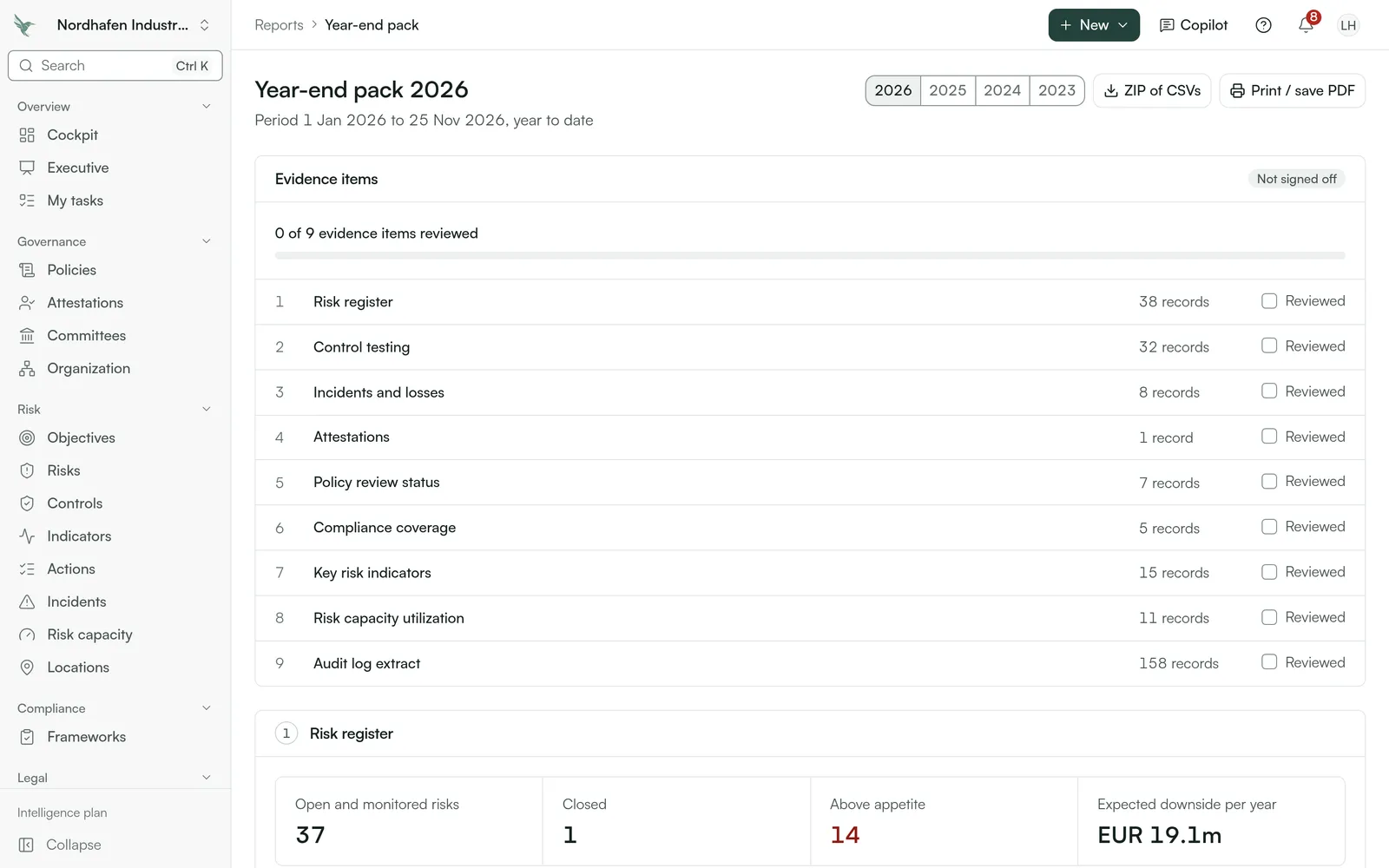
The audit evidence for a financial year in one place: nine evidence items, review ticks, auditor sign-off, print and a ZIP of CSV files.
The year-end pack collects the evidence an auditor asks for at the end of a year. Until it is signed off it is built from live data. Your team reviews each item, then the auditor signs off, and the sign-off freezes the figures. You can print the pack or download all the data as CSV files.
Role needed
Open it from the menu under Year-end pack or from Live views on the report centre. The page follows the language of your interface.
The nine evidence items
| No. | Item | What it holds | CSV file |
|---|---|---|---|
| 1 | Risk register | Every risk with inherent, residual and target scores and expected downside. | 01-risk-register.csv |
| 2 | Control testing | Tests performed in the year, coverage of the control library and failed tests. | 02-control-tests.csv |
| 3 | Incidents and losses | Loss events of the year, gross and net loss against the loss budget. | 03-incidents.csv |
| 4 | Attestations | Policy confirmations asked and answered. | 04-attestations.csv |
| 5 | Policy review status | Approved policies, review dates and what is overdue. | 05-policies.csv |
| 6 | Compliance coverage | Requirement coverage per framework. | 06-compliance.csv |
| 7 | Key risk indicators | Monthly values, worst status and breaches in the year. | 07-kri-history.csv |
| 8 | Risk capacity utilization | Bad year loss against capacity and appetite, one snapshot per month. | 08-capacity.csv |
| 9 | Audit log extract | Changes recorded in the year, with AI-assisted entries marked. On Foundation the pack shows no entries here, because the audit log is part of Intelligence. | 09-audit-log.csv (Intelligence and Tailored only) |
Each item shows how many records it holds. An item with no records is marked No data.
Run the year-end pack
Open the pack and choose the Year in the selector above. You can choose the current year and the three years before. For the current year the pack covers the year to date and says so.
Go through the nine sections on the page. For each item, check the data and tick Reviewed in the Evidence items list at the top. The bar shows how many of the nine are reviewed.
In the Sign-off panel at the bottom, write Notes for the auditor, for example scope, exceptions and explanations, and select Save notes. The notes are printed on the cover page.
When all nine items are reviewed, the auditor selects Sign off as auditor and confirms in the dialog, because the sign-off is the audit statement. The pack then shows "Signed off by", the name, the date and "figures as of sign-off". A manager sees "An auditor or admin signs off." in place of the button once every item is reviewed.
Print the pack, or select ZIP of CSVs to download the evidence files.
Rules:
- The sign-off is only possible when every one of the nine items has a review tick. Until then the button is disabled and shows how many items are not reviewed.
- The sign-off freezes the pack: the page, the print and the ZIP show the figures as they were at sign-off, even when risks, tests or incidents change later. This works like the frozen figures of an approved report.
- Only someone whose access covers the whole organization can sign off, because the frozen pack is shown to everyone. A person scoped to some departments sees the pack of their departments and cannot sign it off.
- After the sign-off, the review ticks and the notes are locked. Reopen the pack asks for confirmation, removes the sign-off and discards the frozen figures, and the pack shows live data again. Both steps are recorded in the audit log.
- The frozen pack keeps the 50 latest audit entries of the year and the total count, so a signed pack stays small. The audit CSV in the ZIP is read from the audit log, up to the moment of sign-off.
- Every tick, every sign-off and every export is recorded in the audit log.
Past years
For a year before the current one that is not signed off, the pack keeps only what can be dated: control tests, incidents, indicator values, attestations, capacity snapshots and audit log entries of that year, and only the risks, controls, policies and indicators that existed on 31 December. The state of those records (scores, status, review dates, compliance coverage) is today's, and the sections say so: "Today's state of the records that existed on" the date. Past states are in the audit log.
Risk capacity snapshots
The capacity of the organization changes with your data. To show its development over the year, the app records one capacity snapshot per month. It records the first one when someone opens the year-end pack in a month. Item 8 shows them as monthly bars and a table with the bad year loss, the capacity, the share used and the appetite.
For the current year you can select Record this month to take the snapshot of the current month again. This needs export access to the audit log, which Admin, Manager and Auditor have. A year without snapshots shows "No snapshot exists for" the year.
Print and ZIP
Print / save PDF produces the pack with a cover page that shows the organization, the period, the date (for a signed pack the date of the sign-off), the checklist with each item Reviewed or Open, the notes, and signature lines for Head of risk and Auditor.
ZIP of CSVs downloads year-end-pack-<year>.zip. It holds the nine CSV files above and a file 00-README.txt with the organization, the period, the export time and the checklist with the record counts. The CSV files list every record with its own currency. The totals on the page add only amounts in the organization currency.
Scope
If your access is limited to some departments, the registers in the pack show only your records. The audit log extract and the capacity snapshots are organization wide, so they are left out for you.
Executive cockpit
The one-screen view for the board and C-level: the risk position, decisions waiting, losses against budget, compliance, legal exposure and contract renewals, always live.
Workflow: quarterly board risk report
How a risk team prepares the quarterly Risikobericht of the management board for the supervisory board, in German, from data check to approval, print and presentation.