Reporting
One place for board reports, management reports and board papers, plus the live executive cockpit and the year-end evidence pack.
Reporting turns the data in your registers into dated documents that a board, a committee or an auditor can rely on. You pick a template, write the narrative, let the app add charts and tables from live data, send the report for approval and print it as a numbered A4 document.
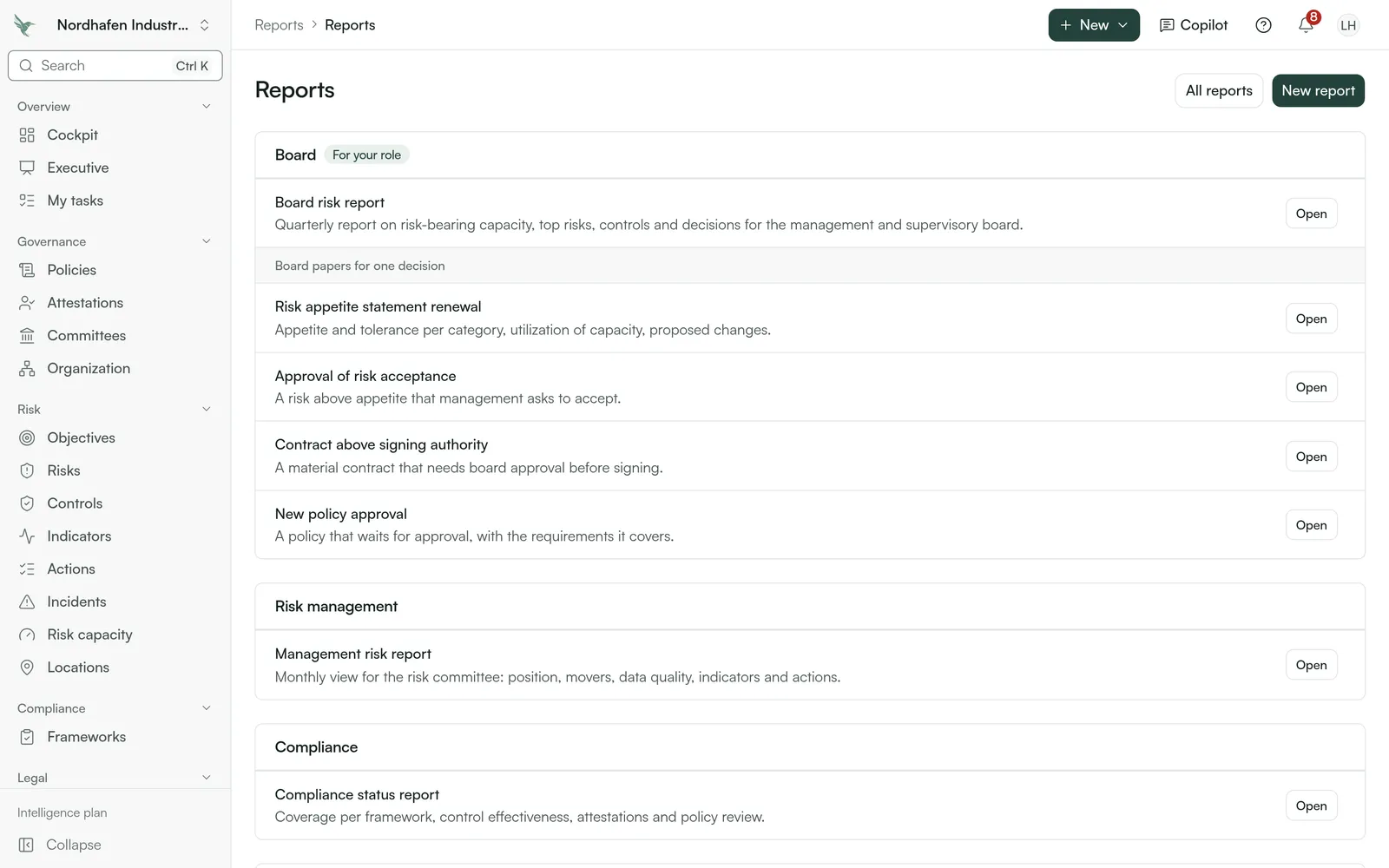
What is in this section
| You want to | Use | Page |
|---|---|---|
| Start from a ready structure for a reader (board, risk, compliance, legal, department) | Templates | Templates |
| Write and edit a report, add sections and charts, draft the text with AI | Report builder | Report builder |
| Know which chart or table you can add and where its numbers come from | Data blocks | Data blocks |
| Freeze the figures, get a document number, issue a new version | Approval and snapshot | Approval and snapshot |
| Hand out a PDF or a paper copy | Print and PDF | Print and PDF |
| See where the organization stands today, on one screen | Executive cockpit | Executive cockpit |
| Collect audit evidence for the financial year | Year-end pack | Year-end pack |
| Produce the quarterly risk report for the board in German | Workflow | Quarterly board risk report |
Reports and live views
There are two kinds of pages.
- Reports are documents. They have an author, a language, a status, an approval, a number and a frozen version. You find them under Reports. A board paper for a single decision is a report from a paper template.
- Live views are screens to work from. They always show today's data and change when the data changes. The Executive cockpit, the Second line view and the Year-end pack are live views. They are listed under Live views on the report centre.
You can also open any report template with live data without saving anything. Use Open on a template in the report centre. That is a preview of the current position, not a document with a number.
Where reports get their data
Every chart and table in a report is a data block that reads the same registers as the rest of the app: risks, capacity, indicators, incidents, actions, controls, compliance, policies, contracts and legal matters. A block only shows what the person who loads it may see. Nothing in a report is typed in twice.
Who can do what
| Role | Reports | Executive cockpit | Year-end pack |
|---|---|---|---|
| Admin | Create, edit, submit, approve, delete drafts | View | Review, sign off, export |
| Manager | Create, edit, submit, delete drafts. Approves only if set as approver, see below | View | Review, export |
| Auditor | View and export | View | View, sign off, export |
| Viewer | View | View | No access |
| Contributor | No access (they see a read-only My area above their list in My tasks) | No access | No access |
A report is approved by the approver an Admin sets on the report centre, by default the role Admin. It can be a role or one named person. Nobody approves their own report, Admins included. See Approval and snapshot.
Department scope applies
If your access is limited to a department, every block, the cockpit and the year-end pack show only the records you may see. The organization-wide audit log and the capacity snapshots are left out of the year-end pack for you.
Plan limits
AI drafting of report text counts against the monthly AI draft limit of your plan.
| Limit | Foundation | Intelligence | Tailored |
|---|---|---|---|
| Members | Unlimited | Unlimited | Unlimited |
| Risks | Unlimited | Unlimited | Unlimited |
| Contracts | Unlimited | Unlimited | Unlimited |
| Knowledge base documents | Unlimited | Unlimited | Unlimited |
| Active automations and agents | 10 | Unlimited | Unlimited |
| Simulation runs this month | 10 | Unlimited | Unlimited |
| Copilot chat requests this month | 10 | 30 per member, pooled | Unlimited |
| AI contract checks this month | 1 | 3 per member, pooled | Unlimited |
| AI table cells this month | 0 | 100 per member, pooled | Unlimited |
| MCP access tokens | 3 | Unlimited | Unlimited |
| Emails sent this month | 1,000 | Unlimited | Unlimited |
| AI drafts this month | 3 | 15 per member, pooled | Unlimited |
| Active AI agents | 0 | Unlimited | Unlimited |
| Document Intelligence pages this month | 20 | 50 per member, pooled | Unlimited |
| File storage | 2 GB | 100 GB | Unlimited |
| Automation runs this month | 1,000 | Unlimited | Unlimited |
| REST API calls this month | 1,000 | 50,000 | 1,000,000 |
| MCP tool calls this month | 1,000 | Unlimited | Unlimited |
Workflow: renewal and notice
How to keep notice deadlines, renew or terminate in time and keep the contract record current afterwards.
Templates
The report templates for board, risk, compliance, legal and department readers, the board paper templates, and how the German board risk report is structured.