Workflow: renewal and notice
How to keep notice deadlines, renew or terminate in time and keep the contract record current afterwards.
Use this workflow every week for the contracts in force. The goal is that no contract renews or ends by accident.
Role needed
Plan needed
Your weekly routine
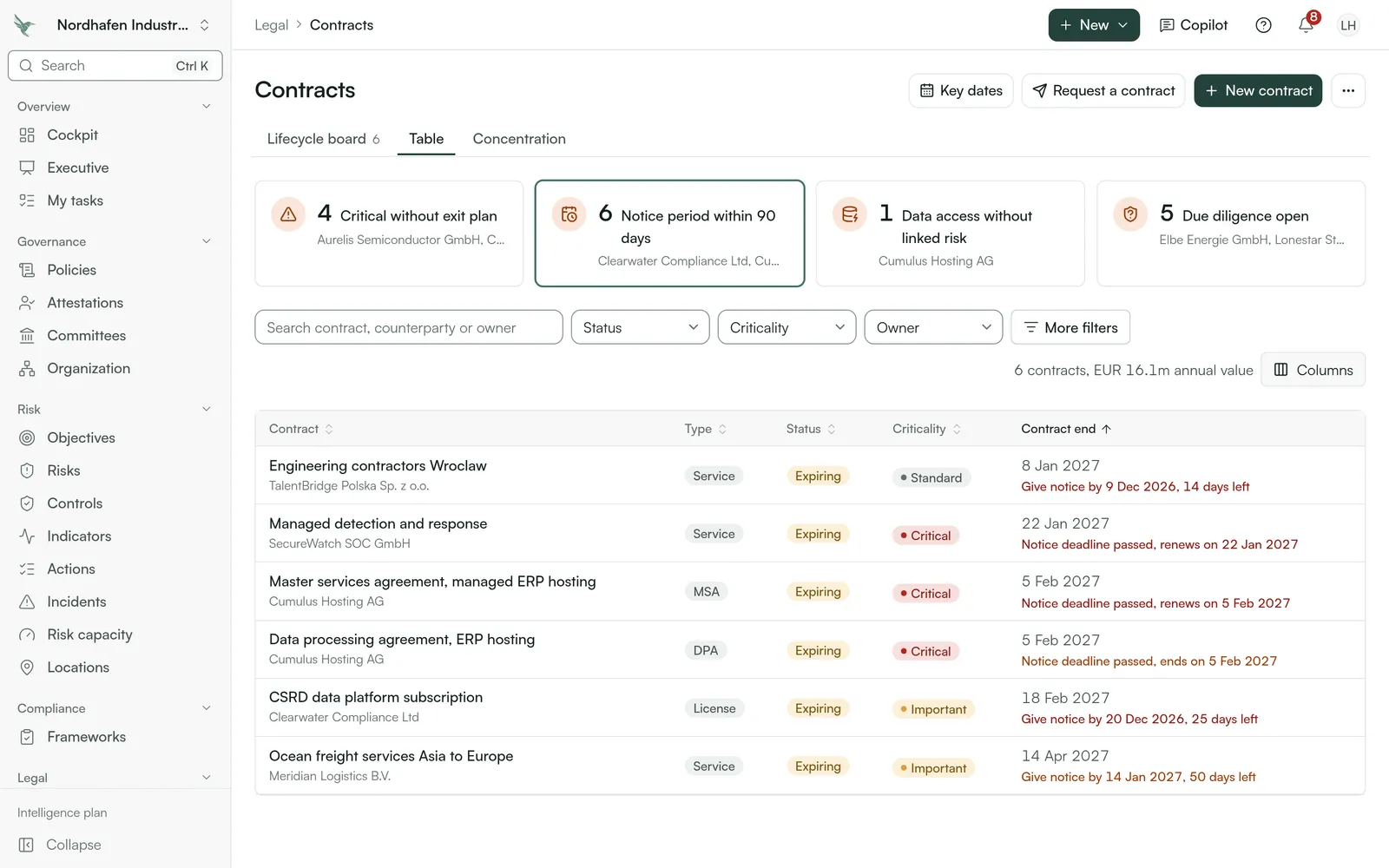
Open Contracts. In the Needs attention strip, select Notice period within 90 days. The list shows contracts whose notice period starts within 90 days or has started.
Open the Contract calendar and check the next weeks. Use Only my dates to see what you own.
For each contract, read the notice line. The notice deadline is the last day to give notice: the end date minus the notice period. "Give notice by 30 Nov 2026, 20 days left" means you have 20 days left; the contract header shows "Notice: 20 days left". "Notice deadline passed, renews on 15 Jan 2027" means the last day to give notice has gone and the contract renews automatically on its end date. Without automatic renewal it reads "Notice deadline passed, ends on …".
Decide: renew, renegotiate or give notice. Use the questions below.
Record the decision on the contract. See below.
Decide
-
Do we still need the service? Ask the owner.
-
How dependent are we? Open the Concentration view. A counterparty in the top 3 or a critical contract without an exit plan deserves more time. Use Critical without exit plan in the strip.
-
How is the counterparty doing? Open the Counterparty. Check the rating, the due diligence status and the next review date. Repeat the sanctions screening if it is older than a year.
-
What did the AI check say? Open the Review tab for the latest score and the open findings. Run a new check on the current version before you renegotiate, see AI contract check.
-
What risks and incidents are linked? Open Linked risks and incidents. Incidents on linked risks are a reason to renegotiate.
-
Need a letter? Select Draft notice letter in the renewal banner. The Copilot drafts a notice letter to the counterparty with the end date and the last day to give notice, names the notice clause it relies on, and leaves date and signature empty. Check it against the contract before you send it.
Record the decision
If the notice deadline is within 90 days or has passed, the contract shows the banner Renewal decision due at the top. It appears for people who may edit the contract, as long as no notice has been given, or only late notice the counterparty has not accepted yet. The same rule applies over the REST API and MCP: a renewal decision is refused for a contract without an end date, outside that window, or after notice was given, and the date notice was sent cannot be in the future or before the contract start.
Select Decide renewal. For contracts that renew automatically the dialog says: "The contract renews automatically if you do nothing."
Under Decision, choose one of three options:
- Renew. Enter the New end date, which must be after the current one, and optionally a New annual value (optional). If you leave the value empty, the current one stays.
- Renegotiate. The contract moves back to negotiation.
- Give notice. Enter Notice sent on. The contract stops renewing and ends on its end date. On that date it changes to Terminated automatically.
- Late notice. If the date is after the notice deadline, the dialog warns: "The notice deadline was … Notice now is late; the contract renews unless the counterparty agrees." The notice is recorded as late notice and the contract keeps renewing; the header shows "Late notice given on …, renews on … unless the counterparty agrees". Tick The counterparty accepted the late notice, the contract ends on its end date only when the counterparty agreed. You can record the decision again later, once they do. Over REST and MCP, send
counterpartyAccepted: true.
Select Record decision. The decision goes into the contract history and clears the notice task. After notice, the contract header shows "Notice given on …, ends on …" and the contract has no notice deadline date any more.
For changed terms, also create an amendment from the menu. A contract that was given notice leaves the calendar and the concentration view.
For a critical contract, also document the exit plan and tick Documented and tested exit plan in the contract. Link the risk of a failed transition.
What the app does for you
- It shows the contract as Expiring while the notice deadline is within 90 days or has passed, and sets it to Expired when the end date has passed without automatic renewal.
- It moves the end date of a contract that renews automatically forward by whole years once it has passed. If you gave notice, it sets the contract to Terminated on the end date.
- It sends reminders 90, 60, 30 and 7 days before the notice deadline to the owner of the contract, or to the people who may approve contracts when no owner is named (Admins and Managers only if there are none).
- It raises the event
contract.notice_duefor each notice deadline. Use it to start an automation or a webhook, see AI and automation. - It shows the same dates in your calendar if you subscribe to the feed, see Contract calendar.