Contract calendar
Notice deadlines, contract ends, renewals and obligation due dates in one calendar, with reminders and a personal calendar feed.
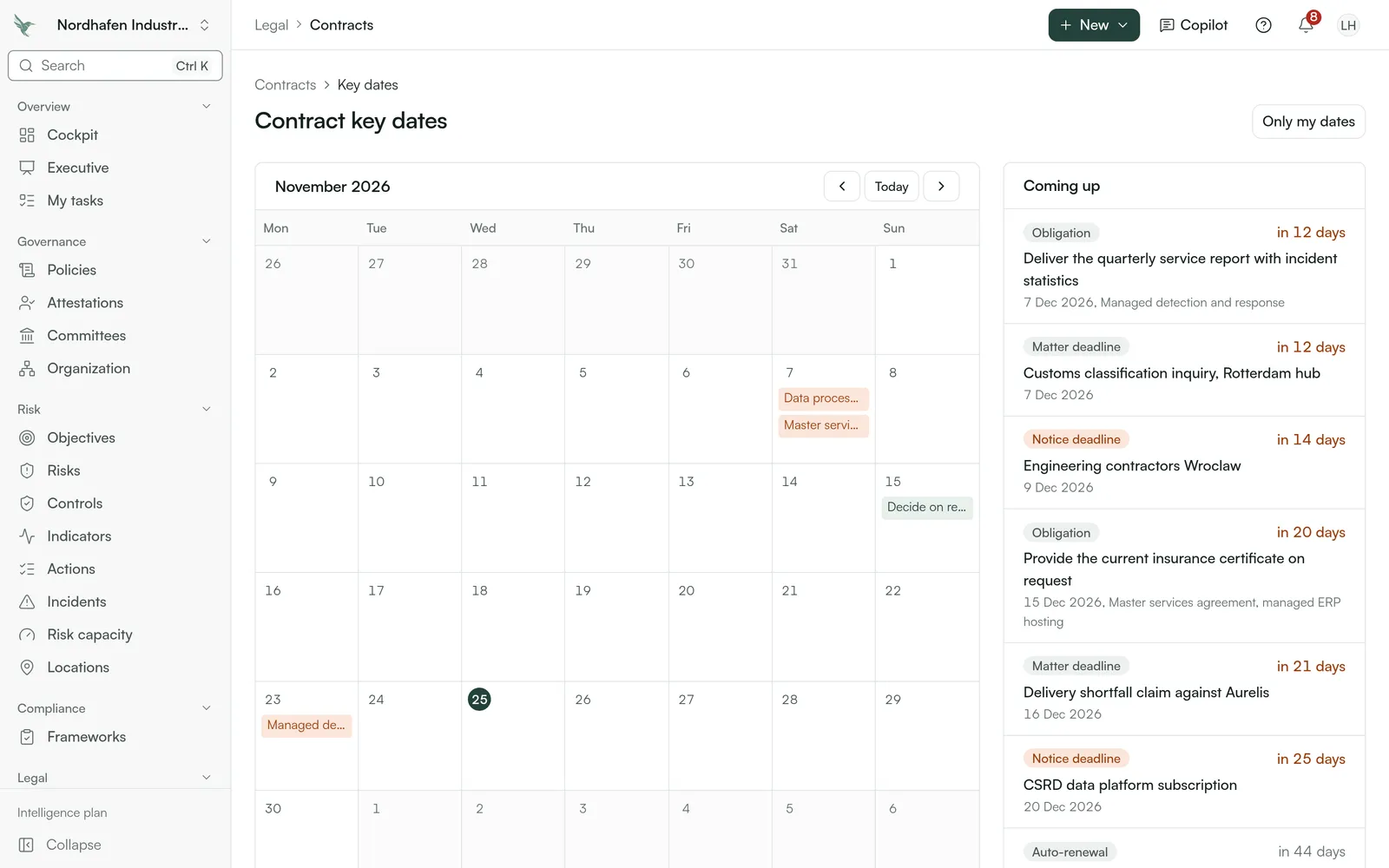
The contract calendar shows every dated event of your contracts in a month view. Use it to see which notice deadlines fall in the next weeks. You find it under Contracts with the button Key dates.
Which dates appear
The app computes the dates from the contract record. You do not enter them separately.
| Date | Shown when |
|---|---|
| Contract start | The contract has a start date and is in force, in Approval or in Signature |
| Notice deadline | The contract is in force, has an end date and no notice given yet. It is the end date minus the notice period in days. For contracts that renew automatically the text reads "Last day to give notice, otherwise it renews" |
| Contract end, or Auto-renewal | The contract is in force and has an end date. A contract that renews automatically shows "Auto-renews" |
| Obligation | An open obligation with a due date. It is labelled "Our obligation" or "Their obligation" |
| Matter deadline | An open deadline of an open or paused matter. The date appears only if you may view matters, and opens the matter |
Contracts that are terminated, expired or not yet in force, and obligations that are drafts, done or waived, produce no dates. Once notice has been given (see Renewal and notice), the notice deadline date disappears. A recurring obligation without a due date of its own gets its next date from its recurrence. With the recurrence "On event" there is no date.
Read the calendar
- Use the arrows and Today to change the month. Weeks start on Monday.
- Select Only my dates to show only the contracts, obligations and matters that you own. Show all dates returns to the full view.
- The Coming up list shows the next dates with the number of days left.
- Select a date to open its contract. An obligation opens the Obligations tab, a matter deadline opens the matter.
- Like the calendar feed, the calendar shows only what you may see. If your access is limited to a department or part of the organization, it contains only your dates within that access.
Reminders
Reminders go out 90, 60, 30 and 7 days before a notice deadline, contract end, renewal or obligation due date. A matter deadline reminds on its own pre-deadlines and on the due date, see Matters.
- Only the most urgent step that has been reached is sent, once per date and step. If you move a date, the reminder is armed again.
- The reminder goes to the owner of the contract or obligation, or the responsible person of the matter deadline. If nobody is named, it goes to the people who handle contracts (everyone who may approve contracts; for a matter deadline, everyone who may edit matters), each counted in their own time zone; only when there are none, to the Admins and Managers.
- Reminders appear as notifications in the app. Matter deadlines raise no event.
- A notice deadline also raises the event
contract.notice_due, once per contract and date. Automations and webhooks can use it, see AI and automation. A due obligation raisesobligation.duefor webhooks. - Contract starts are not reminded.
Reminders are also triggered when someone opens a contract page (checked at most every 30 minutes per organization), so they do not depend on a scheduled job alone.
Subscribe in your own calendar
You can add the dates to Outlook, Google Calendar or Apple Calendar with a personal link in ICS format.
Open the contract calendar and find the Calendar feed panel.
Select Create my feed link. Copy the link at once. It is shown only once.
In your calendar application, add a calendar by URL and paste the link.
Details:
- Each date is an all-day entry. Notice deadlines carry an alarm 7 days before.
- A new link replaces the old one. Turn off the feed revokes it.
- The link is a secret. Anyone who has it can read the dates that you can see. The feed stops working if your account is deactivated or loses the right to view contracts.
- The feed shows what you may see in the app. If your view covers the whole organization, it holds all dates. Otherwise it holds the dates of the contracts and obligations that you own, within your department scope.
Contracts
The contract register with its lifecycle board, table, concentration view, contract record, documents, risk score and register of information.
AI contract check
How the AI contract check compares a contract with your playbook and the DORA Art. 30 and GDPR Art. 28 checklists, how the score works and how you decide on findings.