Clause library
Keep your standard clauses and the playbook that the AI contract check measures every contract against.
The Clause library has two tabs. Clause library holds your standard wording. Playbook holds your negotiation positions. Together they let the whole team negotiate from the same text, and they are the yardstick of the AI contract check.
Role needed
Clauses
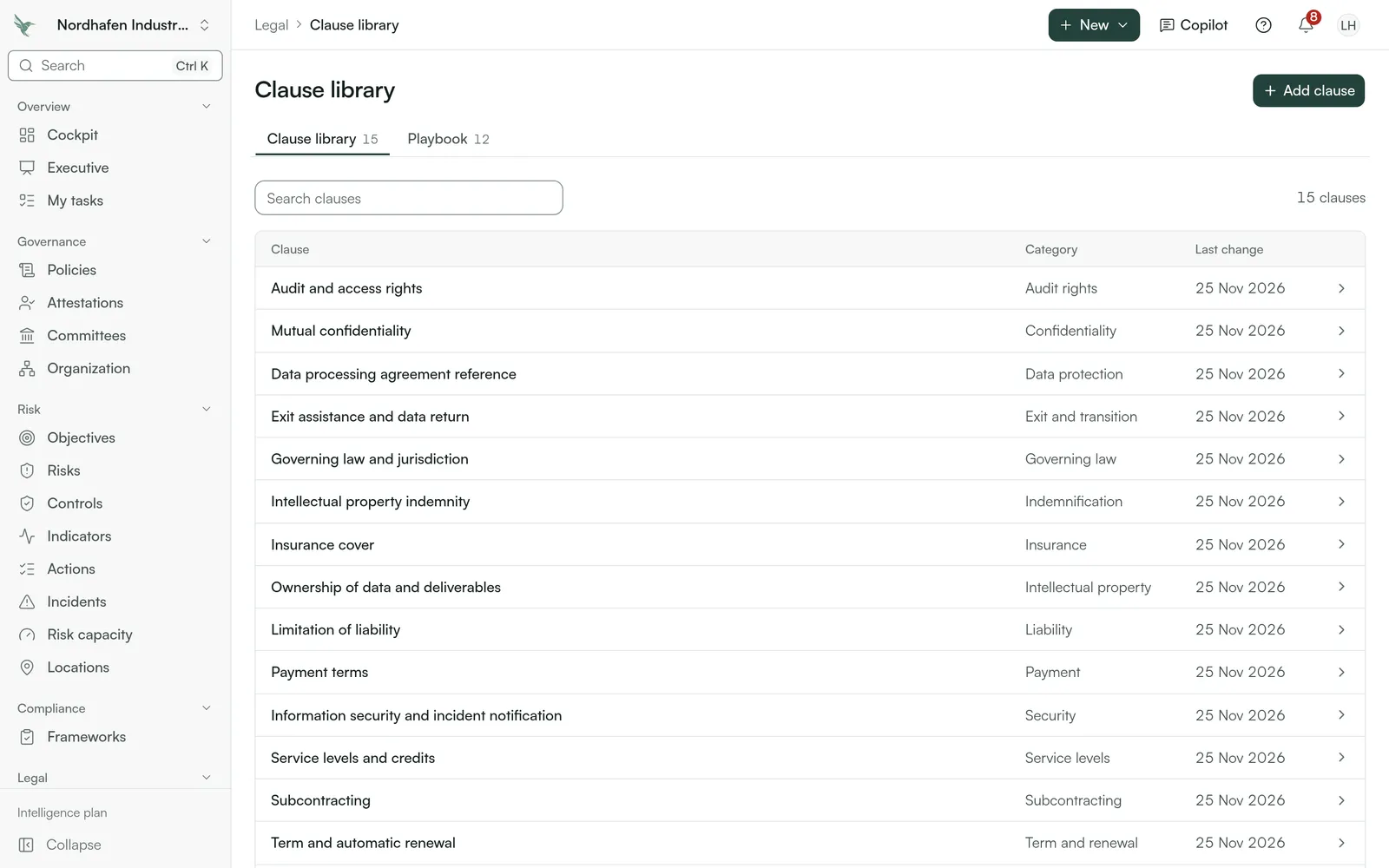
A clause is one reusable contract term. The list is collapsed by default and shows the clause, its category and the date of its last change; use Search clauses to filter, and select a row to read the standard text, fallback and guidance. Add clause is in the page header.
| Field | Use |
|---|---|
| Clause type | One of the 18 types: Liability, Indemnification, Termination, Term and renewal, Payment, Confidentiality, Data protection, Security, Audit rights, Service levels, Subcontracting, Intellectual property, Insurance, Governing law, Force majeure, Assignment, Exit and transition, Other |
| Title | A short name, at least 3 characters |
| Standard text | The wording you propose first, at least 20 characters |
| Fallback text | Acceptable wording if the counterparty pushes back |
| Guidance | When to use the clause and what never to accept |
Open Clause library and select Add clause.
Choose the clause type and enter title, standard text, fallback text and guidance.
Save. Use the copy button on a clause to copy its standard text into your draft.
Playbook rules
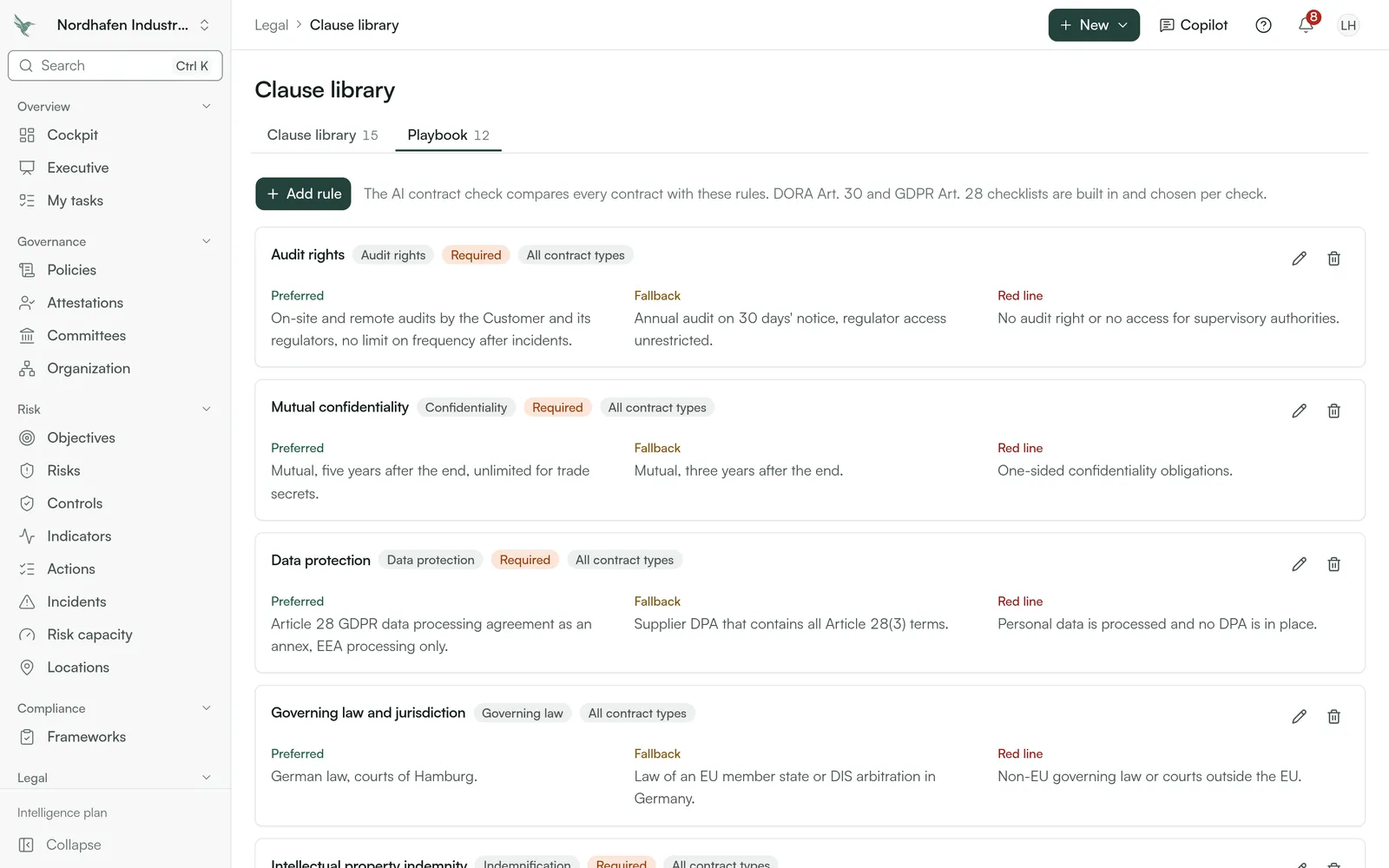
A playbook rule tells the AI check what good looks like for one clause type.
| Field | Use |
|---|---|
| Clause type and Rule title | What the rule is about |
| Preferred position | The position you want, at least 10 characters |
| Fallback | Still acceptable. A clause at this level counts as a minor deviation |
| Red line | Not acceptable. A finding at this level caps the review score |
| Applies to | The contract types the rule is checked on (NDA, MSA, ...). Leave all unticked for All contract types |
| Required | If ticked, a missing clause is a major deviation and the rule weighs more in the score |
Open the Playbook tab and select Add rule.
Choose the clause type. To start from a clause of your library, select Insert standard clause and pick it. This fills preferred position and fallback.
Write or adjust the red line and tick Required where a missing clause must be flagged.
Under Applies to, tick the contract types the rule is meant for, for example only NDAs. A check of a contract skips the rules for other types.
Save the rule. It applies to the next AI check.
Built-in regulatory checklists
Below the playbook, the page lists the two checklists that ship with the app: DORA Art. 30 ICT contract requirements and GDPR Art. 28 processor terms, each with its number of requirements. You choose them per check and they apply on top of the playbook. You cannot edit them. The DORA items for Art. 30(3) apply only to critical or important functions.
Good practice
- Write the red line as a position, not as a wish. The check compares the contract with it.
- Mark only clauses as Required that you will not sign without. A required rule weighs three times as much as an optional one.
- Keep the guidance short and practical, for example "A 72 hour incident notice leaves no time to report on time."
Question tables
Ask the same questions across many contracts. The AI answers each cell from that contract's own document with the quoted passage, and people verify, correct or flag the answers.
Contract obligations
Track what you and your counterparties owe under a contract, with due dates, owners and reminders. Let AI read the contract and propose drafts.