Legal
Contracts, counterparties, legal matters, the clause library and the AI contract check, and how they connect to risk and compliance.
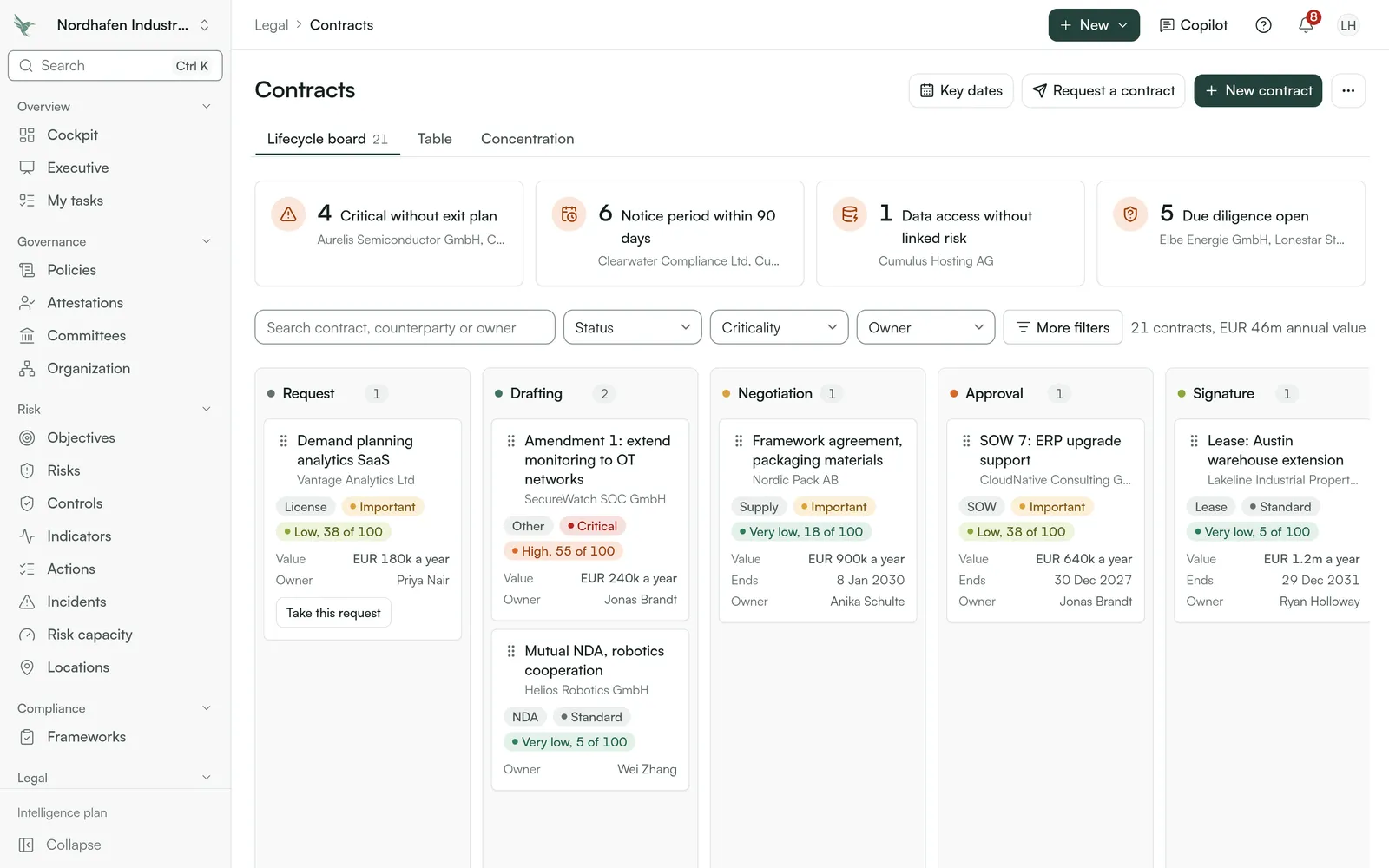
The Legal section holds everything you need to run contracts from the first request to the last renewal. It also keeps the third-party view (counterparties) and the legal cases that can cost money (matters).
Everything here is linked to the rest of the suite. A contract can carry risks, a matter feeds the risk register, and the contract fields feed the DORA register of information.
What you use it for
| You want to | Go to |
|---|---|
| Ask legal for a new contract | Contract request |
| Ask legal a question, or have a contract reviewed | Request a contract and Ask legal in the New menu, see Contract request and Matters |
| Fill the key data of a contract from its document, compare two versions | Contracts, Contract review |
| Keep court and filing deadlines of a case | Matters |
| Track a contract from draft to signature | Contracts, Contract review |
| Know when to give notice | Contract calendar, Renewal and notice |
| Check a contract against your playbook, DORA and GDPR | AI contract check |
| Keep standard wording and your negotiation positions | Clause library |
| Follow what each side owes under a contract | Contract obligations |
| Keep due diligence and sanctions screening of the other side | Counterparties |
| Track litigation, disputes and the exposure they carry | Matters |
How the pieces connect
- A counterparty is created for you when you type a new name on a contract. One counterparty can have many contracts.
- A contract links to risks in the register. A contract with data access and no linked risk is flagged on the Contracts page.
- Obligations belong to a contract. Open obligations with a due date appear in the contract calendar and trigger reminders.
- A matter links to contracts and risks. You can send its exposure to the risk register as a risk.
- The clause library and its playbook are the yardstick of the AI contract check.
- Moving a contract to Approval creates an approval request that the approver decides in My tasks.
What is new in the legal modules
- Playbook by contract type. A rule applies only to the contract types you tick under Applies to. The check judges every clause from our side, as set in Our role on the contract. See Clause library and AI contract check.
- Review side by side. The contract with the cited passage marked on one side, the findings with note and proposed wording on the other. See AI contract check.
- Fill from document and Compare with previous version on the contract record. See Contracts and Contract review.
- One front door for the business. Request a contract and Ask legal are in the New menu. Both land in the queue of legal, and the asker is told when legal answers. See Contract request.
- Counterparty due diligence warns, it does not block. A contract moved to Approval whose counterparty has no approved due diligence carries a warning for the approver. See Counterparties.
- Copilot for legal. Search contracts, matters, counterparties and house clauses, ask about one contract, and draft a notice letter. See Copilot.
- Matter deadlines with pre-deadlines, a responsible person and reminders, shown in the Contract calendar.
- Contracts list: Columns menu and Export PDF. See Contracts.
- Legal role. Intelligence organizations create it with New Legal role. See Legal counsel.
Who sees what
Access comes from your role. The Legal modules are Contracts, Counterparties, Matters, Clause library and Contract obligations.
| Role | Contracts | Counterparties, Matters, Clause library, Contract obligations |
|---|---|---|
| Admin, Manager | Everything | Everything |
| Contributor | View, create, and edit contracts they own | Not shown |
| Auditor, Viewer | Read only | Read only |
| A custom role such as Legal | As granted | As granted |
If your access is limited to a department, you see only the contracts of that department. Counterparties and matters follow the contracts and risks they are linked to. Records you cannot see are counted but not shown, for example "1 linked risk, not visible with your access".
Plan limits
The number of contracts and the monthly AI contract checks depend on your plan.
| Limit | Foundation | Intelligence | Tailored |
|---|---|---|---|
| Members | Unlimited | Unlimited | Unlimited |
| Risks | Unlimited | Unlimited | Unlimited |
| Contracts | Unlimited | Unlimited | Unlimited |
| Knowledge base documents | Unlimited | Unlimited | Unlimited |
| Active automations and agents | 10 | Unlimited | Unlimited |
| Simulation runs this month | 10 | Unlimited | Unlimited |
| Copilot chat requests this month | 10 | 30 per member, pooled | Unlimited |
| AI contract checks this month | 1 | 3 per member, pooled | Unlimited |
| AI table cells this month | 0 | 100 per member, pooled | Unlimited |
| MCP access tokens | 3 | Unlimited | Unlimited |
| Emails sent this month | 1,000 | Unlimited | Unlimited |
| AI drafts this month | 3 | 15 per member, pooled | Unlimited |
| Active AI agents | 0 | Unlimited | Unlimited |
| Document Intelligence pages this month | 20 | 50 per member, pooled | Unlimited |
| File storage | 2 GB | 100 GB | Unlimited |
| Automation runs this month | 1,000 | Unlimited | Unlimited |
| REST API calls this month | 1,000 | 50,000 | 1,000,000 |
| MCP tool calls this month | 1,000 | Unlimited | Unlimited |