AI contract check
How the AI contract check compares a contract with your playbook and the DORA Art. 30 and GDPR Art. 28 checklists, how the score works and how you decide on findings.
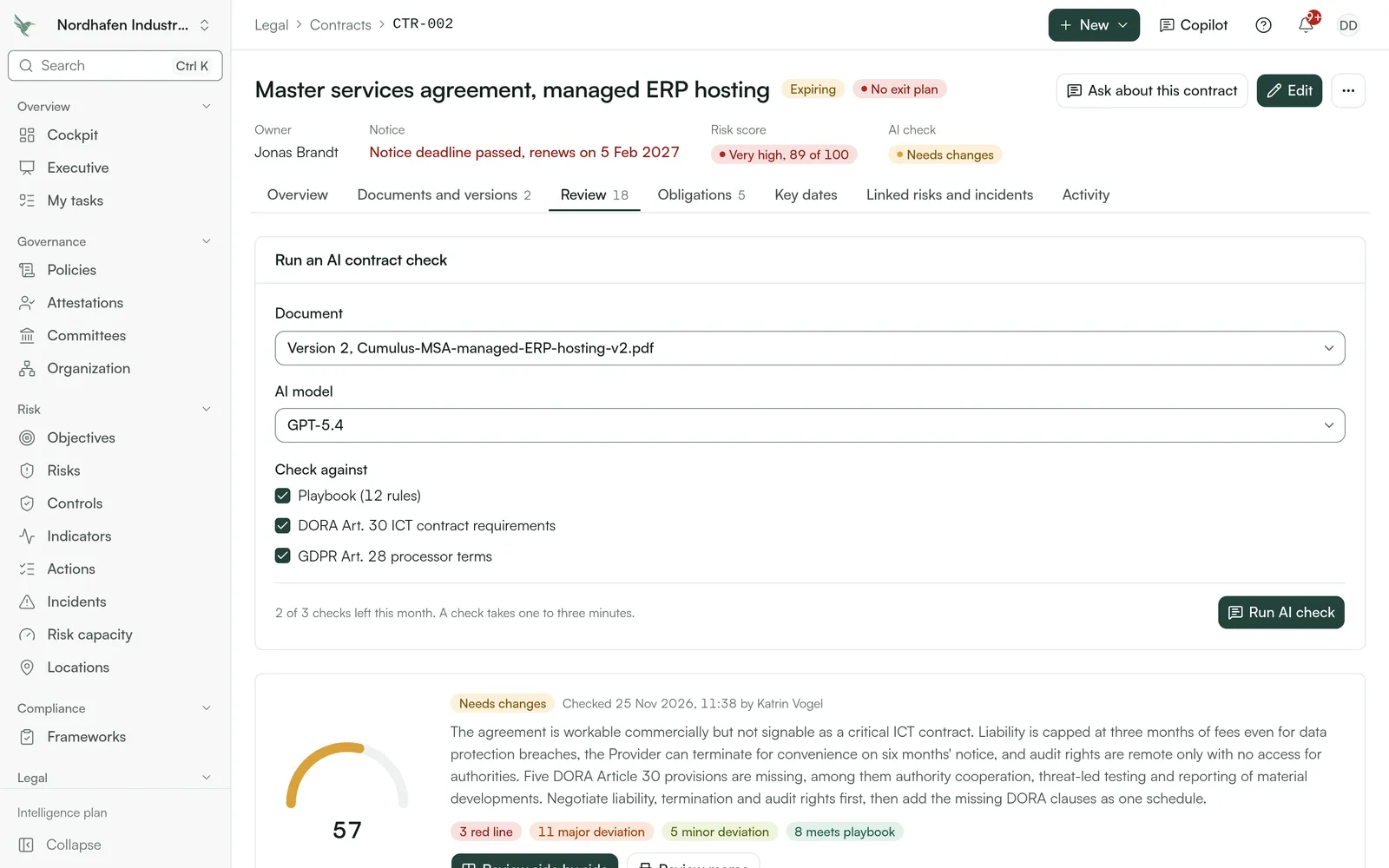
The AI contract check reads a contract document clause by clause and compares it with your negotiation positions and with regulatory checklists. It gives you a list of findings, a score from 0 to 100 and a review memo.
The check prepares your work. It does not replace it. Findings are drafts until a person accepts or dismisses them, and the memo says so.
What you need
Role needed
- AI is set up. An administrator connects Azure OpenAI. Without it, the Run AI check button is disabled and the tab says "AI is not configured for this workspace".
- A document with readable text. Upload a PDF or DOCX on the Documents and versions tab first. See Contracts.
- Something to check against. Select the playbook, a regulatory checklist, or both.
- Room in your plan. Each check uses one of your monthly AI contract checks. The Review tab shows how many are left.
| Limit | Foundation | Intelligence | Tailored |
|---|---|---|---|
| Members | Unlimited | Unlimited | Unlimited |
| Risks | Unlimited | Unlimited | Unlimited |
| Contracts | Unlimited | Unlimited | Unlimited |
| Knowledge base documents | Unlimited | Unlimited | Unlimited |
| Active automations and agents | 10 | Unlimited | Unlimited |
| Simulation runs this month | 10 | Unlimited | Unlimited |
| Copilot chat requests this month | 10 | 30 per member, pooled | Unlimited |
| AI contract checks this month | 1 | 3 per member, pooled | Unlimited |
| AI table cells this month | 0 | 100 per member, pooled | Unlimited |
| MCP access tokens | 3 | Unlimited | Unlimited |
| Emails sent this month | 1,000 | Unlimited | Unlimited |
| AI drafts this month | 3 | 15 per member, pooled | Unlimited |
| Active AI agents | 0 | Unlimited | Unlimited |
| Document Intelligence pages this month | 20 | 50 per member, pooled | Unlimited |
| File storage | 2 GB | 100 GB | Unlimited |
| Automation runs this month | 1,000 | Unlimited | Unlimited |
| REST API calls this month | 1,000 | 50,000 | 1,000,000 |
| MCP tool calls this month | 1,000 | Unlimited | Unlimited |
What it checks against
| Source | What it is |
|---|---|
| Playbook | Your own rules from the Clause library: preferred position, fallback, red line and whether the clause is required |
| DORA Art. 30 | ICT contract requirements of Regulation (EU) 2022/2554 |
| GDPR Art. 28 | Processor terms of Regulation (EU) 2016/679 |
DORA and GDPR are pre-selected when the contract is tagged with them. GDPR is also pre-selected for the contract type Data processing agreement. The playbook is pre-selected when it has rules.
DORA Art. 30 checklist
The items marked in the last column are checked only when the contract is rated critical or important. For a standard contract the app checks the first nine.
| Article | Requirement | Critical or important only |
|---|---|---|
| Art. 30(2)(a) | Service description and subcontracting | |
| Art. 30(2)(b) | Locations of service and data processing | |
| Art. 30(2)(c) | Availability, authenticity, integrity and confidentiality | |
| Art. 30(2)(d) | Access, recovery and return of data | |
| Art. 30(2)(e) | Service level descriptions | |
| Art. 30(2)(f) | Assistance in ICT incidents | |
| Art. 30(2)(g) | Cooperation with authorities | |
| Art. 30(2)(h) | Termination rights and notice periods | |
| Art. 30(2)(i) | Security awareness and resilience training | |
| Art. 30(3)(a) | Full service levels with precise targets | x |
| Art. 30(3)(b) | Notice periods and reporting obligations | x |
| Art. 30(3)(c) | Business contingency plans and security measures | x |
| Art. 30(3)(d) | Participation in threat-led penetration testing | x |
| Art. 30(3)(e) | Access, inspection and audit rights | x |
| Art. 30(3)(f) | Exit strategy and transition period | x |
GDPR Art. 28 checklist
| Article | Requirement |
|---|---|
| Art. 28(3) | Subject matter, duration, nature and purpose |
| Art. 28(3)(a) | Processing only on documented instructions |
| Art. 28(3)(b) | Confidentiality of authorised persons |
| Art. 28(3)(c) | Security of processing |
| Art. 28(2) and (4) | Sub-processors |
| Art. 28(3)(e) | Assistance with data subject requests |
| Art. 28(3)(f) | Assistance with Articles 32 to 36 |
| Art. 28(3)(g) | Deletion or return of data |
| Art. 28(3)(h) | Information, audits and infringing instructions |
Run a check
Open the contract and go to the Review tab.
Under Document, choose the version to check.
Under Check against, tick the playbook and the checklists you want. You need at least one.
Select Run AI check. A check takes one to three minutes. You can leave the page. The result stays on the Review tab. A check that has run for more than 15 minutes is marked as failed, and you can run it again.
The check fits the contract. Playbook rules apply only when their Applies to includes the contract type (or is empty). The AI judges every clause from our side, as set in Our role on the contract (Customer, Supplier or Other), and writes explanations in your language; proposed wording follows the language of the contract.
On a new check of a later version, a finding whose quoted passage is unchanged takes over the earlier status, note and decider. Its note starts with "Carried over from version n". A finding whose passage changed starts as a draft again.
The check uses a model from the EU Data Zone by default. Where your plan offers a model choice, a AI model field appears. A Claude model may process the contract text outside the EU; the form then shows a notice. An EU-only Tailored configuration hides these models.
Read the findings
For every requirement the check returns one finding.
| Field | Meaning |
|---|---|
| Present or Missing | Whether a matching clause was found |
| Deviation | Meets playbook, Minor deviation, Major deviation or Red line |
| Quoted passage and page | The text found in the contract, with its page. For a PDF, Show in document opens the file at that page with the passage marked |
| Explanation | One or two sentences on how the clause differs from your position |
| Suggested redline | Wording you could propose to the counterparty |
How the deviation is set:
- Meets playbook: the clause meets your preferred position or an acceptable equivalent.
- Minor deviation: the clause is within your fallback.
- Major deviation: the clause is worse than your fallback or incomplete.
- Red line: the clause crosses your red line or contradicts the regulatory requirement.
A missing clause can never be rated "Meets playbook". It is rated as a major deviation, or as a red line if your red line says that absence is not acceptable. If the rating cannot be made, a missing required clause or a missing regulatory item counts as major, and any other missing clause as minor.
Every quoted passage is searched in the document word for word. A passage that cannot be found is dropped, and the page number comes from where the text was found, not from the model. The contract text is treated as data. Instructions inside the contract are ignored.
Use the filters above the table to narrow by deviation, source and decision.
Decide on each finding
Open a finding that is not "Meets playbook".
Select Accept if you agree and want the change. Accepted findings go into the memo as agreed changes for the counterparty.
Select Dismiss if the finding does not apply. For a red line finding you must give a short reason (at least 3 characters); it is stored with the finding and shown in the history. Dismissed findings are excluded from the score. Select Reopen to undo a decision.
The score is recalculated after every decision.
The score
The score starts at 100. Each requirement counts with a weight: 3 for required playbook rules and for every regulatory item, 1 for optional playbook rules. A minor deviation takes a quarter of the weight, a major deviation 60 percent and a red line the full weight.
Two caps stop one serious problem from hiding among many small passes:
- one red line caps the score at 59,
- one major deviation caps it at 84.
| Score | Band |
|---|---|
| 85 to 100 | Ready to sign |
| 70 to 84 | Negotiate minor points |
| 50 to 69 | Needs changes |
| 30 to 49 | Significant gaps |
| 0 to 29 | Do not sign as drafted |
The latest score also feeds the contract's risk score.
Review side by side
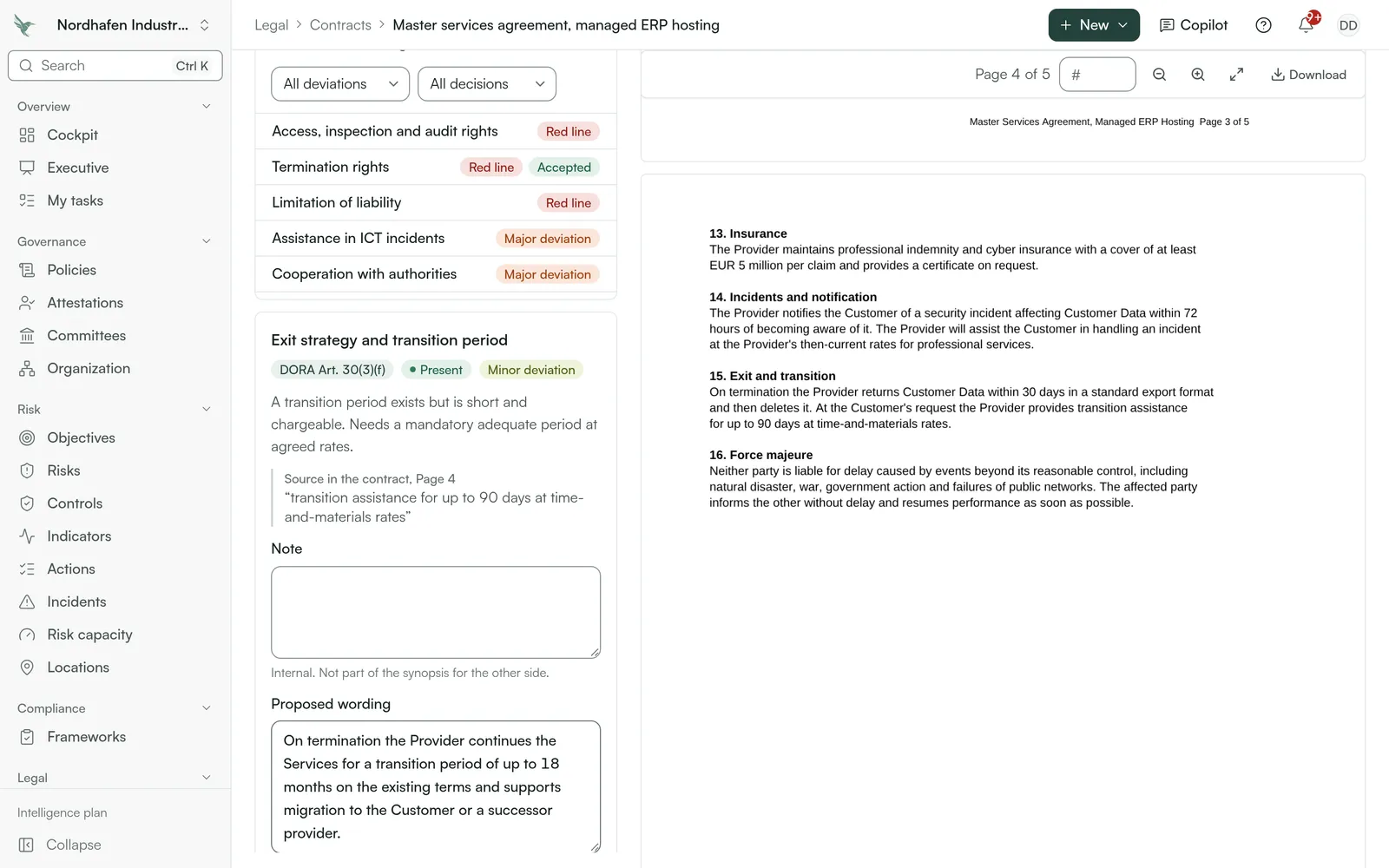
Select Review side by side on the Review tab to decide on all findings of a check on one page. The contract is on one side and the findings on the other; on a narrow screen they are stacked. Selecting a finding takes the document to its passage and marks it, without reloading the page. A PDF shows the boxes of the quote; a DOCX file has no page view, so its extracted text is shown with the paragraphs that hold the quote marked.
- Keys: J next finding, K previous finding, A accept, D dismiss. The arrow buttons do the same. The keys are off while you type in a field.
- Each finding has a Note (internal, up to 1,000 characters) and the Proposed wording, which you can edit before you copy it with Copy wording. Select Save note and wording to keep them without changing the decision.
- A decision records who made it and when. If someone else changed the finding meanwhile, the save is refused with the usual "Changed by ..." message and nothing is overwritten.
- The filters by deviation and decision work as in the table.
The review memo
Select Review memo on the Review tab to open a printable memo. It holds the score and band, a short summary written for the general counsel, red lines, major and minor deviations, the clauses that meet the position, the agreed changes for the counterparty and a line for the counsel who reviewed it. Use Print to save it as PDF. Notes and edited wording appear in the memo. Earlier checks stay listed under Earlier checks with their own memo.
Synopsis for the other side on the memo page opens a second print layout with three columns only: clause, current text and proposed text. It leaves out explanations, notes, scores and decisions, and lists the findings that are not dismissed and have a proposed wording, so you can send it to the counterparty.
Fill from document
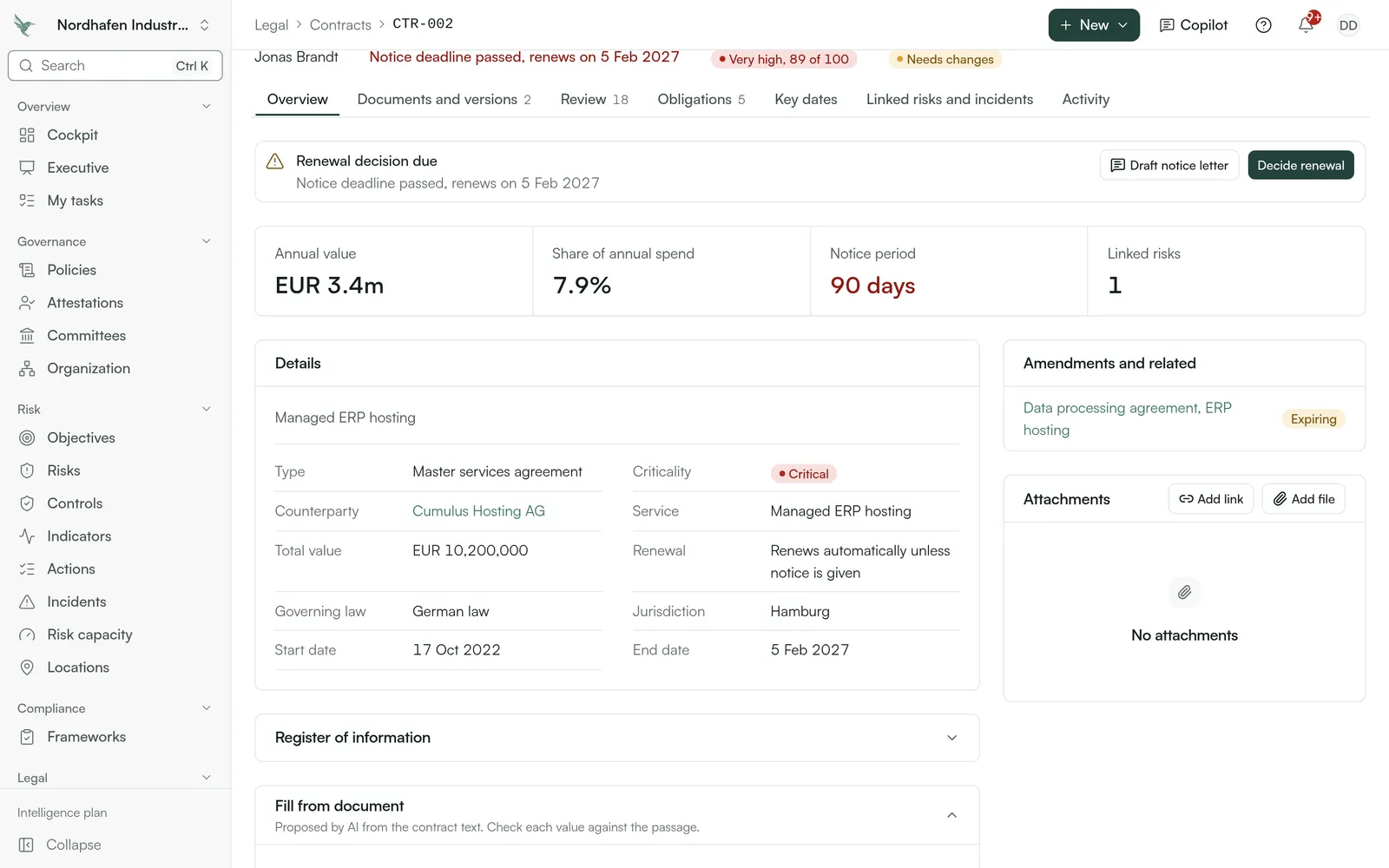
The same AI reads a contract document and proposes the key data of the contract record, each value with its passage. See Contracts. It counts as one AI contract check and writes nothing until you tick values and apply them.
Which model reads your contract
Legal AI steps (contract check, obligations, fill from document) use an EU Data Zone model by default. Where your plan offers a Claude model, you can pick it for Fill from document; the page then shows a notice that this model may process the contract text outside the EU. A Tailored organization can be set to EU-only on request, and the Claude models are then not offered.
Limits to keep in mind
- The check reads text. Scans are read with OCR on the hosted service; a file with no readable text at all cannot be checked.
- The AI can miss a clause or misjudge one. A person must review accepted and dismissed findings.
- The check is no legal advice. Your counsel makes the decision.
- Show in document marks the passage with a box when the PDF has a text layer (read by Document Intelligence or the built-in reader) or when Document Intelligence read a scan. A scan read without Document Intelligence opens on the page without a box. DOCX contracts have no viewer.
- The quoted passage is a help to find the clause. Always read the clause in the contract.
Contract calendar
Notice deadlines, contract ends, renewals and obligation due dates in one calendar, with reminders and a personal calendar feed.
Question tables
Ask the same questions across many contracts. The AI answers each cell from that contract's own document with the quoted passage, and people verify, correct or flag the answers.