Matters
Track litigation, disputes, regulatory cases and advisory work with exposure, probability, deadlines and external counsel, and send the exposure to the risk register.
A matter is a legal case that can cost money or needs a deadline: litigation, a dispute, a regulatory case, advisory work or an intellectual property case. The page Matters gives legal and risk management one list with exposure, probability and the next deadline.
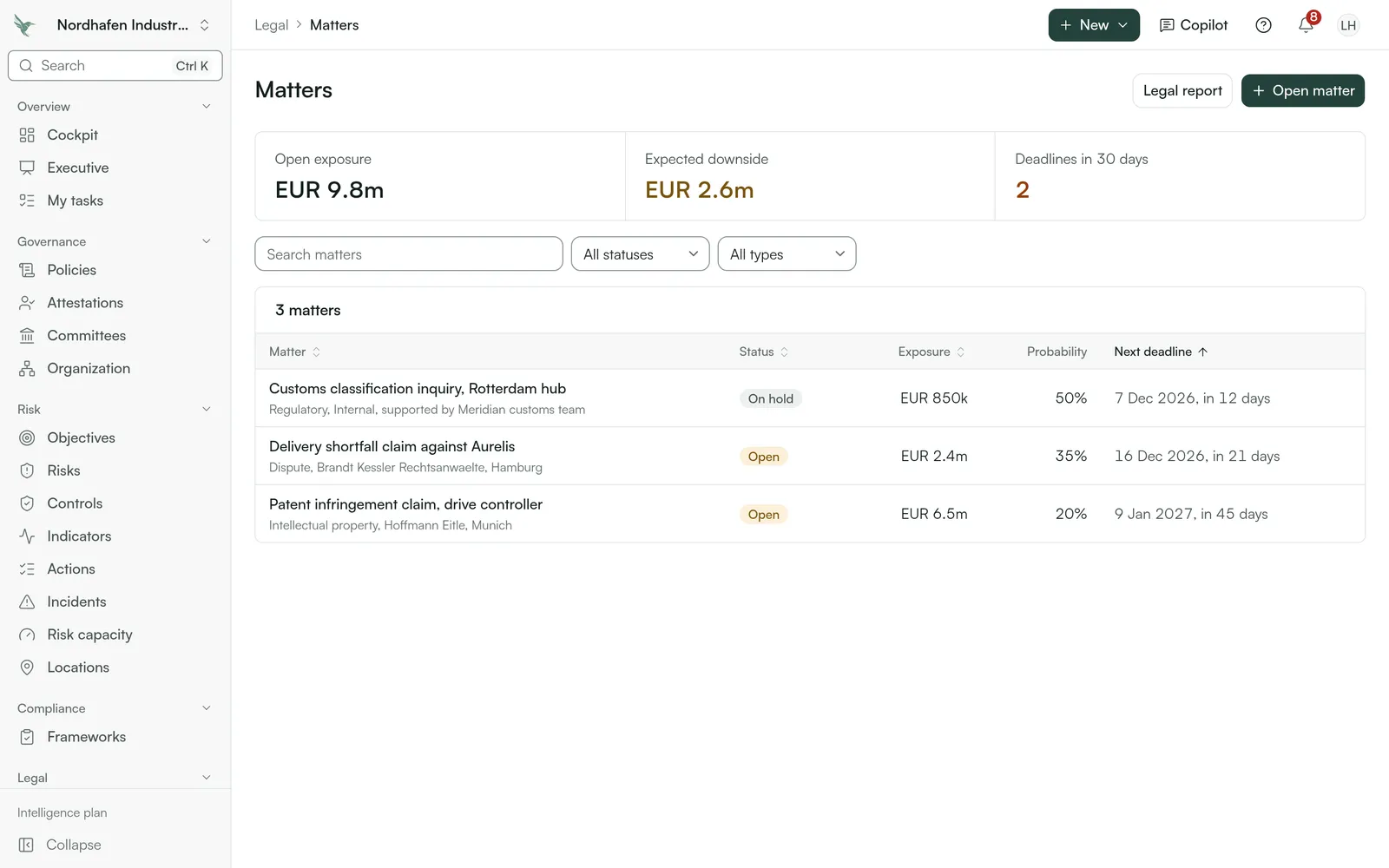
The overview
The tiles show:
- Open exposure: the sum of exposure of matters that are open or on hold,
- Expected downside: exposure times probability,
- Deadlines in 30 days.
The table shows type, status, exposure, probability, expected downside, next deadline and the linked register risk. Filter by search (title or external counsel), status and type.
Types: Litigation, Dispute, Regulatory, Advisory and Intellectual property. Statuses: Open, On hold, Settled and Closed.
Open a matter
Role needed
Select Open matter.
Enter a title, the type and the status.
Enter the Exposure: the worst realistic amount at stake. Enter the Probability (%): the chance that the exposure materializes. Choose the currency or keep your organization's.
Enter the external counsel, the owner and a description. Add the deadlines on the matter record afterwards.
Link the contracts the matter involves. If you may view risks, link existing risks as well.
Save. The expected downside is calculated for you.
A matter has no department of its own. It is visible to people who can see the contracts and risks it is linked to. The contract record shows its matters on the Linked risks and incidents tab.
Send the exposure to the risk register
The exposure of a matter counts in capacity and reporting only once it is a risk in the register. The matter record has one button for this, depending on your rights.
| Button | When |
|---|---|
| Add to risk register | You may create risks, and the matter has no risk yet |
| Refresh risk from exposure | You may create risks, and the matter already has a risk |
| Send exposure to risk management | You may not create risks. If you may not edit the linked risk either, risk management is asked to update the register, and the matter shows "Exposure update pending" until they confirm |
The risk is created like this:
- Category Compliance, the matter title as title (no prefix), review date in 90 days, owner from the matter.
- Annual frequency is the probability. The severity at the 95th percentile is the exposure, and the median is 60 percent of it.
- Likelihood follows the probability: below 20 percent is level 1, from 20 percent level 2, from 40 percent level 3, from 60 percent level 4 and from 80 percent level 5.
- Impact is the level of your organization's risk matrix that the exposure falls into. Without a matrix of your own, or if the matter is in another currency, built-in thresholds apply.
- The risk closes when the matter is Settled or Closed, unless the risk is above appetite without an approved acceptance. A reopened matter reopens a closed risk. A risk in Monitoring stays there.
After that, renaming the matter renames the risk, and a save of the matter that changes exposure, probability or currency updates the risk's scores and loss figures; a status change updates the risk status as above. Other edits leave the risk as risk management shaped it. A matter risk that someone set to the effect Upside or Both, or changed by hand to Scoring while it holds its own estimate, no longer receives the exposure of the matter. A risk scored by hand that holds no estimate still takes it and becomes an estimate again. Every change to the risk is recorded in its history. The record shows the Linked risk and the history. See Risk.
Keep it current
Update exposure and probability when counsel changes the assessment. The register follows on the next save.
Ask legal (everyone who may request a contract)
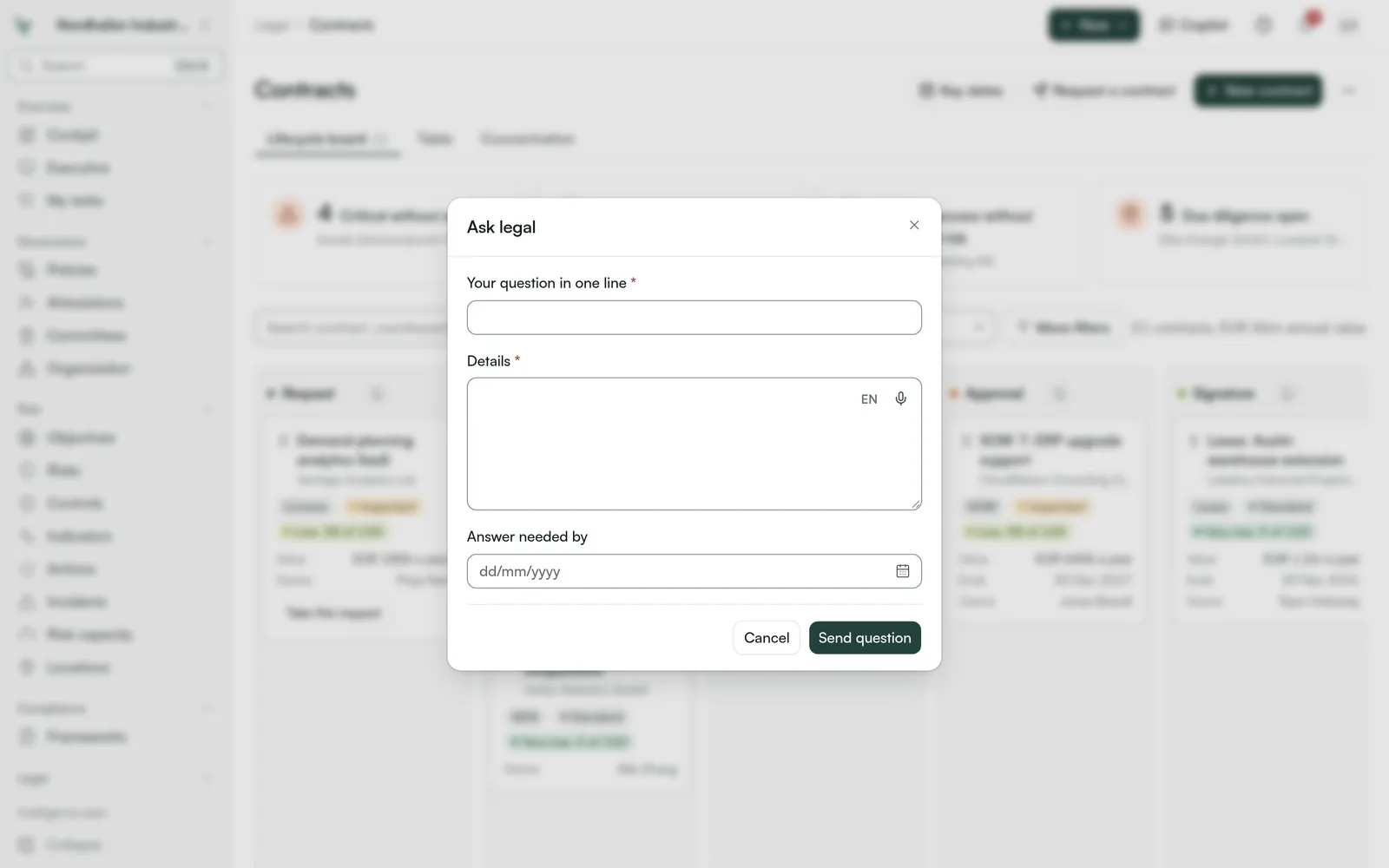
Anyone who may request a contract, for example a Contributor, can choose Ask legal in the New menu. It creates an advisory matter with no personal owner (legal assigns one) and notifies everyone who may edit matters with "New legal question from ...". The asker does not get the Matters page. They see their own questions, and only those, above the board on Contracts under Your questions to legal, also after legal has assigned the matter to someone. The matter page shows Asked by for legal.
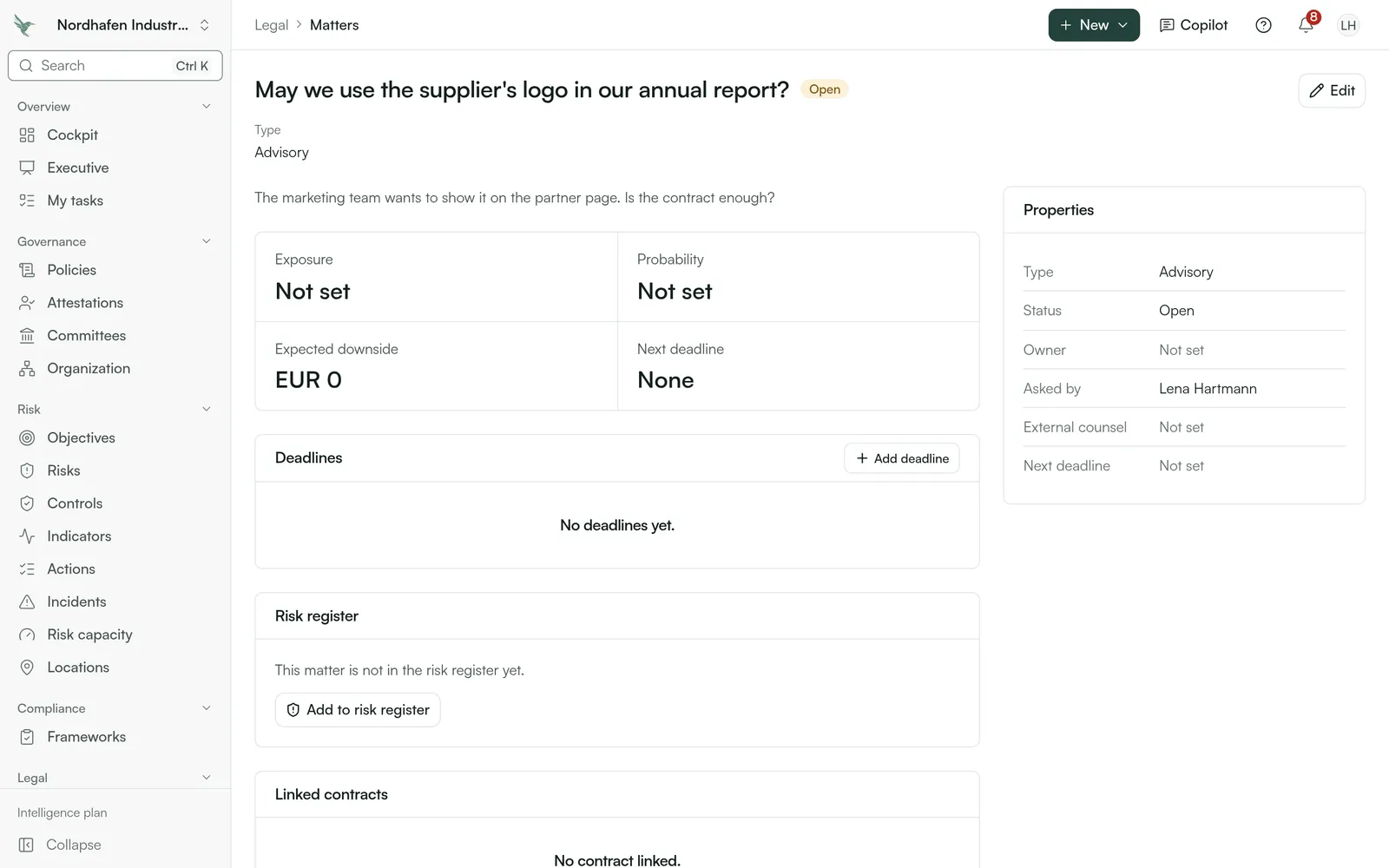
When legal changes the status of your question you get the notification "Your question to legal is now ...", and when legal answers with a comment for you (API POST /matters/{id}/comment) you get "Legal answered your question: ..." with the comment text. Both follow your notification settings and arrive in your language. Legal writes that comment in the box Message to the requester on the matter page (shown for questions from Ask legal, to everyone who may edit matters); the message is not internal, the asker receives it and reads it under Your questions to legal on Contracts, and it also appears in the matter history. Internal changes to the matter, such as edits to the description, are never sent, and the person who makes a change is not notified of it.
Deadlines
Role needed
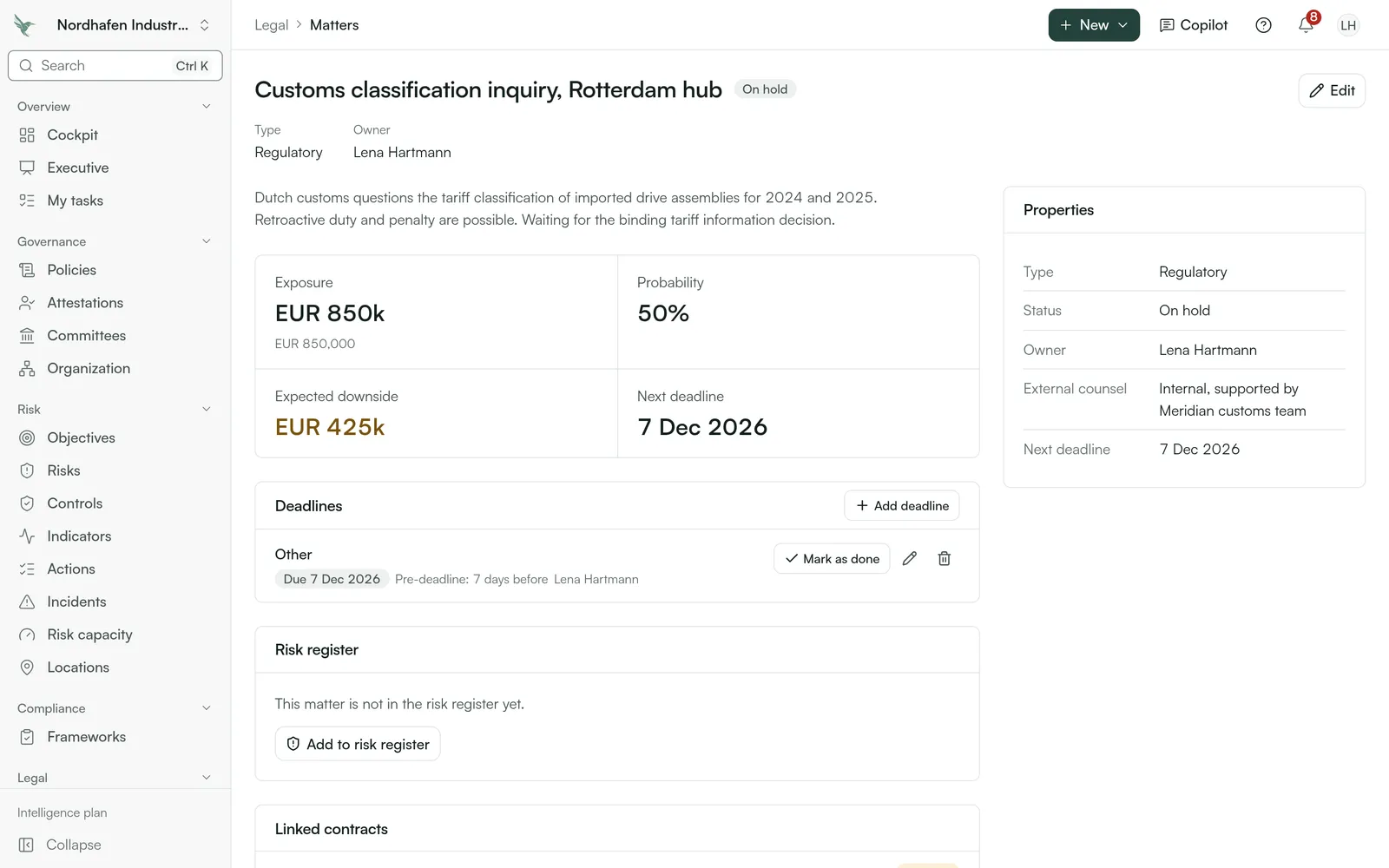
A matter has any number of Deadlines. Open the matter and select Add deadline. Each deadline has:
- a Type: Court, Filing, Response, Hearing, Internal or Other,
- a Due date,
- Pre-deadlines (days before), comma separated, for example
14, 7, 1. You can enter up to six. Reminders go out on these days and on the due date itself, - a Responsible person. Without a name, the people who may edit matters are reminded.
Mark as done records who did it and when, and stops the reminders. Reopen undoes it. A deadline that is open and past its due date shows Overdue, in the matter and in the Next deadline column of the list, counted in your own time zone. The list sorts by the next open deadline of each matter. The API field nextDeadline of a matter is that date; it is set by the deadlines, not written directly.
What matters do not do
- Matters have no calendar of their own. Every open deadline of an open or paused matter does appear as Matter deadline in the Contract calendar, for everyone who may view matters.
- The reminders on the pre-deadlines and on the due date are notifications only. They go to the responsible person of the deadline, or to the people who may edit matters when nobody is named, each counted in their own time zone. There is no event for automations and webhooks.