Workflow: raise a risk
How anyone describes a risk in their own words, how it reaches the risk team, and how the team takes it, completes it and accepts or declines it.
Use this workflow when you see something that could go wrong and you are not the person who runs the risk register. You describe it in your own words. The app sends it to the risk team responsible for your department. The team completes the record and tells you how it ends.
Role needed
Plan needed
Raise it (anyone)
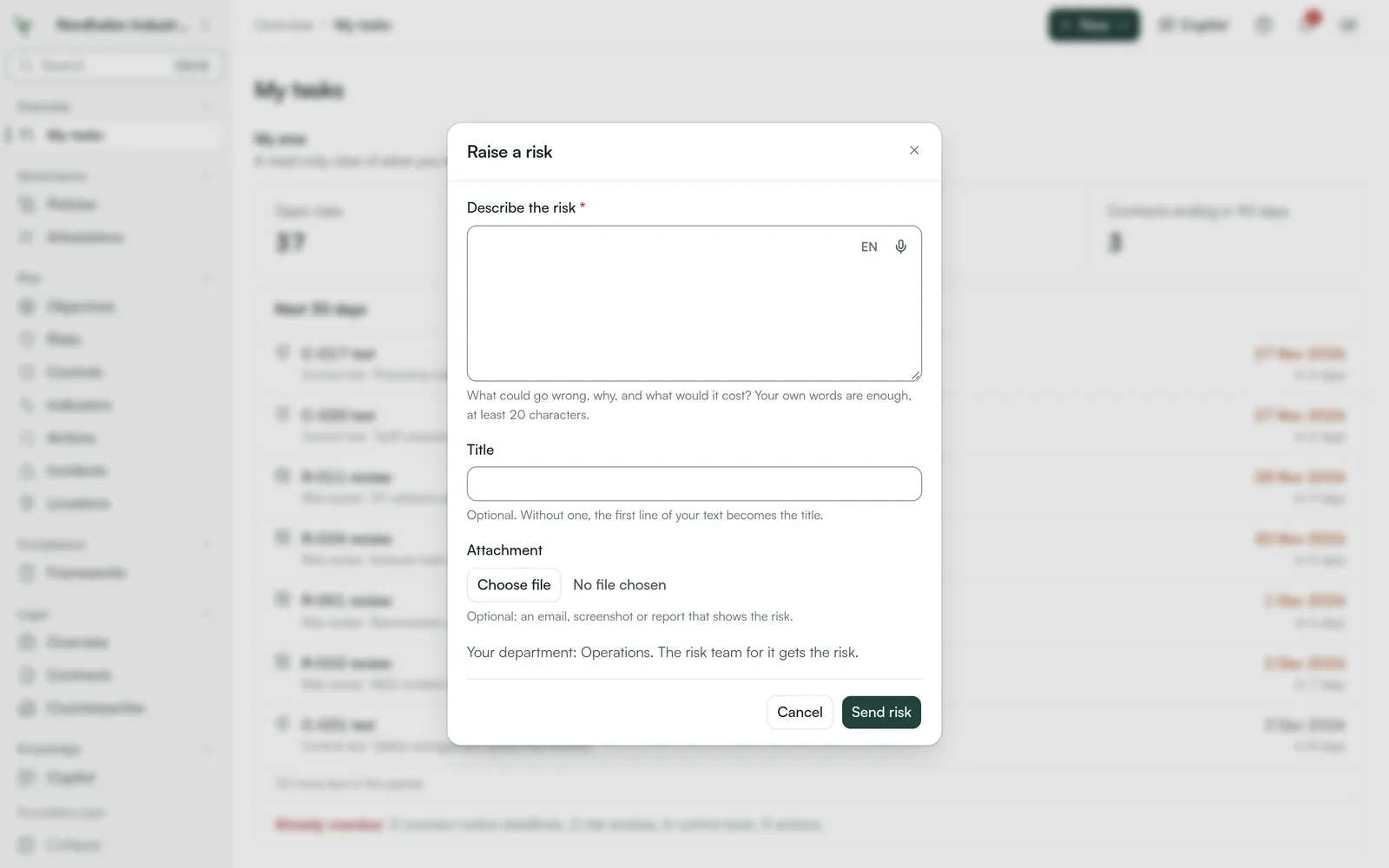
Open New in the top bar and choose Raise a risk.
Under Describe the risk, write what could go wrong, why, and what it would cost, in your own words (at least 20 characters). Dictation works here.
Optional: select Tidy up with AI. It suggests a short title and summary in place of your text; check both, or select Undo to get your text back. Your own text is kept for the risk team either way: they see it under "The requester's own words, before the AI tidy-up" next to the summary. The button appears only when your admin allows it. Each tidy-up uses one AI draft of your plan.
Optional: enter a Title. Without one, the first line of your text becomes the title.
Optional: under Attachment add an email, screenshot or report that shows the risk.
Select Send risk. The form says which team has it, for example "Sent to the risk team for Finance.", and by when the team should pick it up. Track it opens My tasks; Raise another starts an empty form.
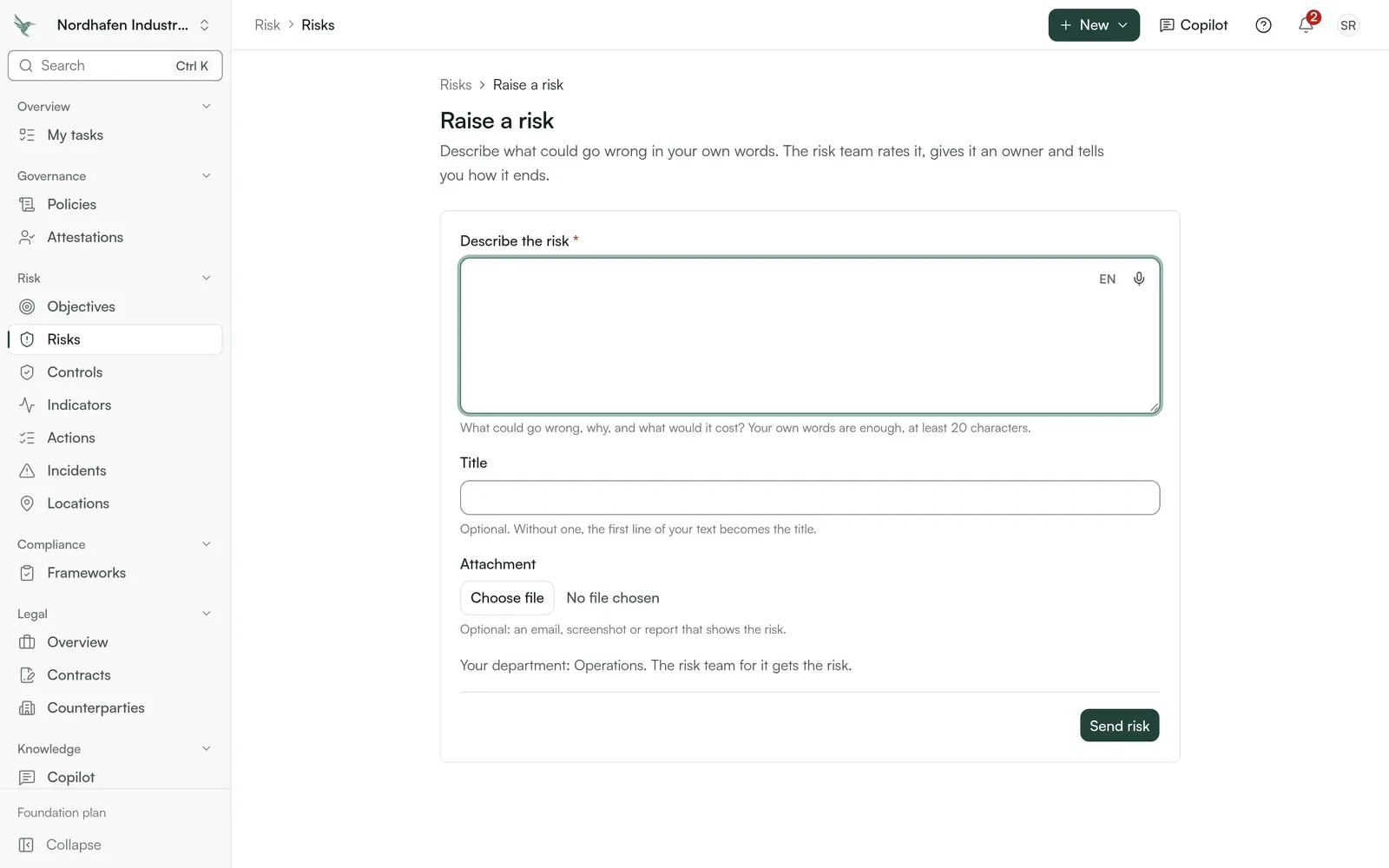
You do not rate the risk, pick a category or an owner, or set a department. The form shows your department, taken from your profile. The same form is also a page, /risks/raise, for phones and links. If you may only edit your own risks, Risks shows Raise a risk in place of New risk and opens that page.
Who gets it
The app routes the risk to the responsible team:
- If an admin set a Risk team group (Settings > Organization, panel Raised risks and contract requests): the members of that group with Approve on Risks for your department.
- Otherwise, people with Approve on Risks whose department scope covers your department (or a department above it).
- If there are none, people with Approve on Risks for the whole organization.
- If there are none, the admins.
You are never on that list, even if you have the right yourself: nobody decides what they raised. The team gets the notification "New risk raised by your name: title" and the item "Raised risk" in My tasks. The item is due after the number of working days set under Days to pick up a raised risk (5 by default).
The same applies when someone who may only edit their own risks creates a risk on Risks > New risk, through the API or the MCP server, accepts a Copilot draft, or runs an automation list sync: the risk is always saved as a draft and goes to the team the same way. Choosing the status Open does not skip the team.
Take it, complete it, decide (risk team)
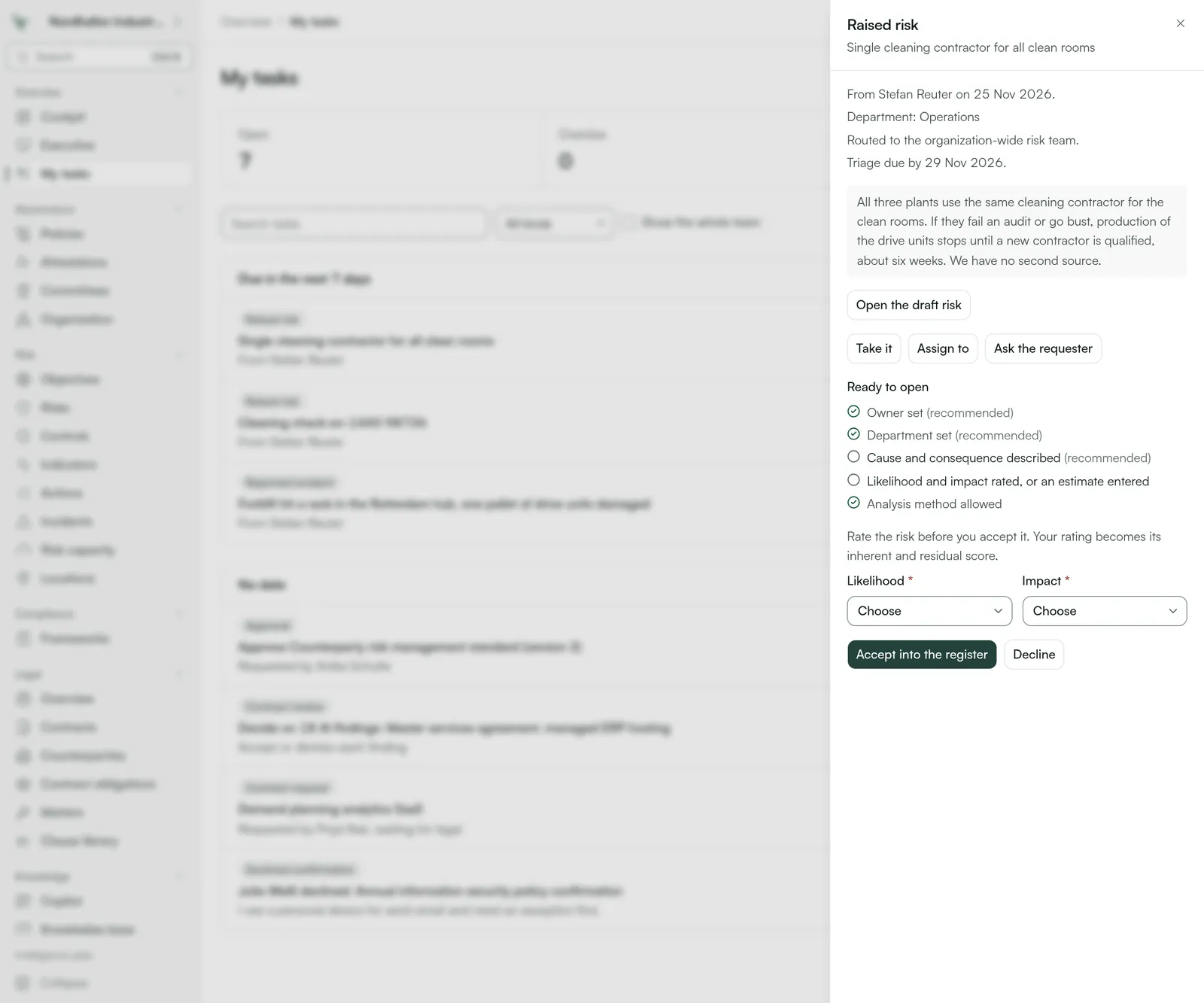
Open the notification or the item "Raised risk" in My tasks. The drawer shows who raised it and when, their department, how it was routed, when it is due, their text and the attachment.
Select Take it, or Assign to and pick a Team member from the responsible team. The person who raised it is told who handles it, and the item now shows only in that person's tasks. Someone who already has it cannot be overtaken with Take it; Assign to hands it over.
If something is unclear, select Ask the requester, write the Question and select Send question. The item shows "Waiting for the requester." and has no due date until they answer. Their answer appears in the drawer under Questions to the requester, and the due date moves on by the days it waited.
Check Ready to open: owner, department, cause and consequence (recommended), the rating or an estimate, the objective if your organization requires one, and an allowed analysis method. To complete the record, select Complete the risk. The form opens with the requester's text and the checklist on top, and the checklist follows what you fill in. Draft the rest with AI fills cause, consequence and the ratings from the requester's text; it uses one AI draft and keeps the title. Check every value, then save the risk with the status Open, or save it as a draft and come back. A risk scored by hand counts as rated only after you changed its rating or AI filled it.
Choose Likelihood and Impact. Your rating becomes the inherent and residual score of the risk. If your organization rates risks with a loss estimate, the drawer says so: enter the estimate on the draft risk first. If your organization requires an objective, choose it under Objective.
Select Accept into the register to open the risk, or Decline. A decline needs a Reason of at least 5 characters, unless you choose the risk it repeats under Duplicate of.
Opening the draft on its own form (status Open or Monitoring) accepts it too: the item closes and the person who raised it is told. Bulk status changes skip a raised risk scored by hand, so it never enters the register with the placeholder score 3 x 3, and nobody opens a risk they raised themselves.
Find them in the register
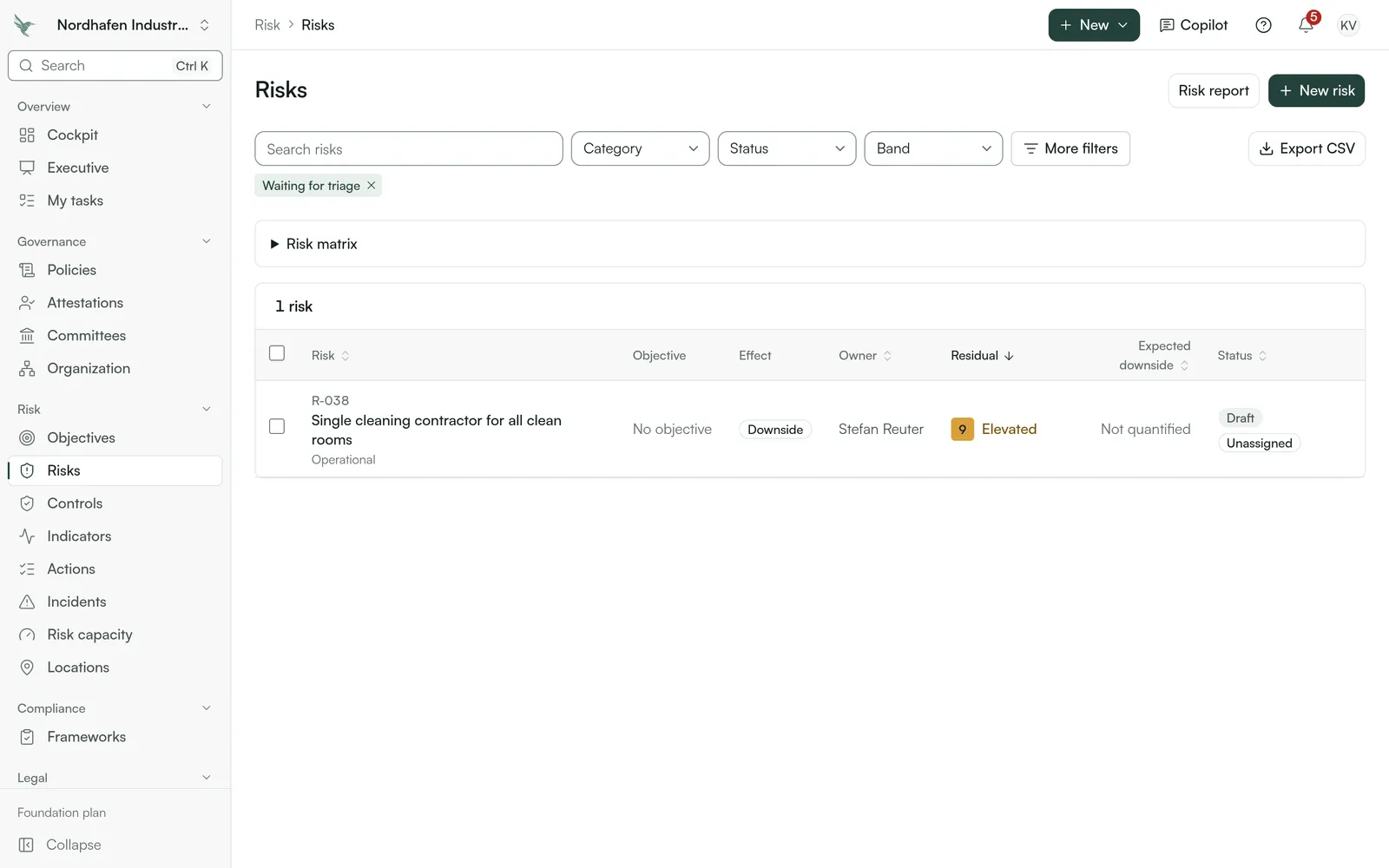
On Risks, turn on Waiting for triage to list the raised risks nobody has decided yet. Next to the status each shows Unassigned, Taken by and a name, or Waiting for the requester. The filter is shown to people with Approve on Risks.
Reminders and escalation
The day before a raised risk is due, the person who took it gets a reminder, or, while nobody has taken it, the routed team. Once the due date has passed, the people with Approve on Risks for the whole organization and the admins are told. Each reminder goes out once per due date, never to the requester, and follows everyone's notification preferences. While the team waits for the requester's answer there are no reminders.
What the requester sees
Under Raised by me in My tasks you see what you raised, with its state:
| State | Meaning |
|---|---|
| New, waiting for the team | Nobody has taken it yet. |
| Taken | Someone in the risk team handles it. Their name is shown. |
| Question for you | The team asked something. Select Answer the question, or open the task "Question for you", write Your answer, optionally add an Attachment, and select Send answer. The file is stored on the risk, also when someone on the team owns it by then. |
| Accepted | The risk is in the register. Select the title to open it. |
| Declined | The team declined it. Their reason is shown, or "Duplicate of" and the code of the risk it repeats. The draft stays, so you can still read it. |
| Closed | The risk was later closed. |
You get a notification when the risk is taken or assigned, when the team has a question, and when it is accepted or declined (with the reason). The same list shows your contract requests and the incidents you reported.
Good to know
- REST:
POST /intake/risksraises a risk,POST /intake/{id}/taketakes it,POST /intake/{id}/assignassigns it (member_id),POST /intake/{id}/askasks the requester (question),POST /intake/{id}/answeris the requester's answer (answer),POST /intake/{id}/reviewaccepts it (likelihood,impact,objective_id) or declines it (comment,duplicate_of). See API reference. - REST:
POST /intake/risksneeds onlydescription(at least 20 characters without atitle); the answer names the team (team) and the due date (due_at).GET /risks?triage=trueis the register filter. - Admins set the team group, the due days and Requesters may tidy their description with AI under Settings > Organization: Risk team group, Days to pick up a raised risk. Working days count Monday to Friday; public holidays are not known to the app.
- A declined risk stays a draft. Drafts are left out of the heat map, campaigns and the capacity simulation.