Audit log
See who changed what and when, filter by object, person and date, and find every change that a person accepted from an AI draft.
The audit log records every change made in your organization, whether by a person in the app, through the API or MCP, by the Copilot after a person accepted a draft, or by an automation. It is the evidence for "who did this, and when".
Role needed
Plan needed
GET /api/v1/audit-log answers 402 there. After a downgrade or when a trial ends, the log is hidden again; nothing is deleted, and it reappears with everything in it when you upgrade.If your role is limited to some departments, the log shows only the entries about records you may see in those departments, and your own changes. Entries about settings, members, tokens and other organization-wide items are left out. The filters and the export follow the same rule.
Open it
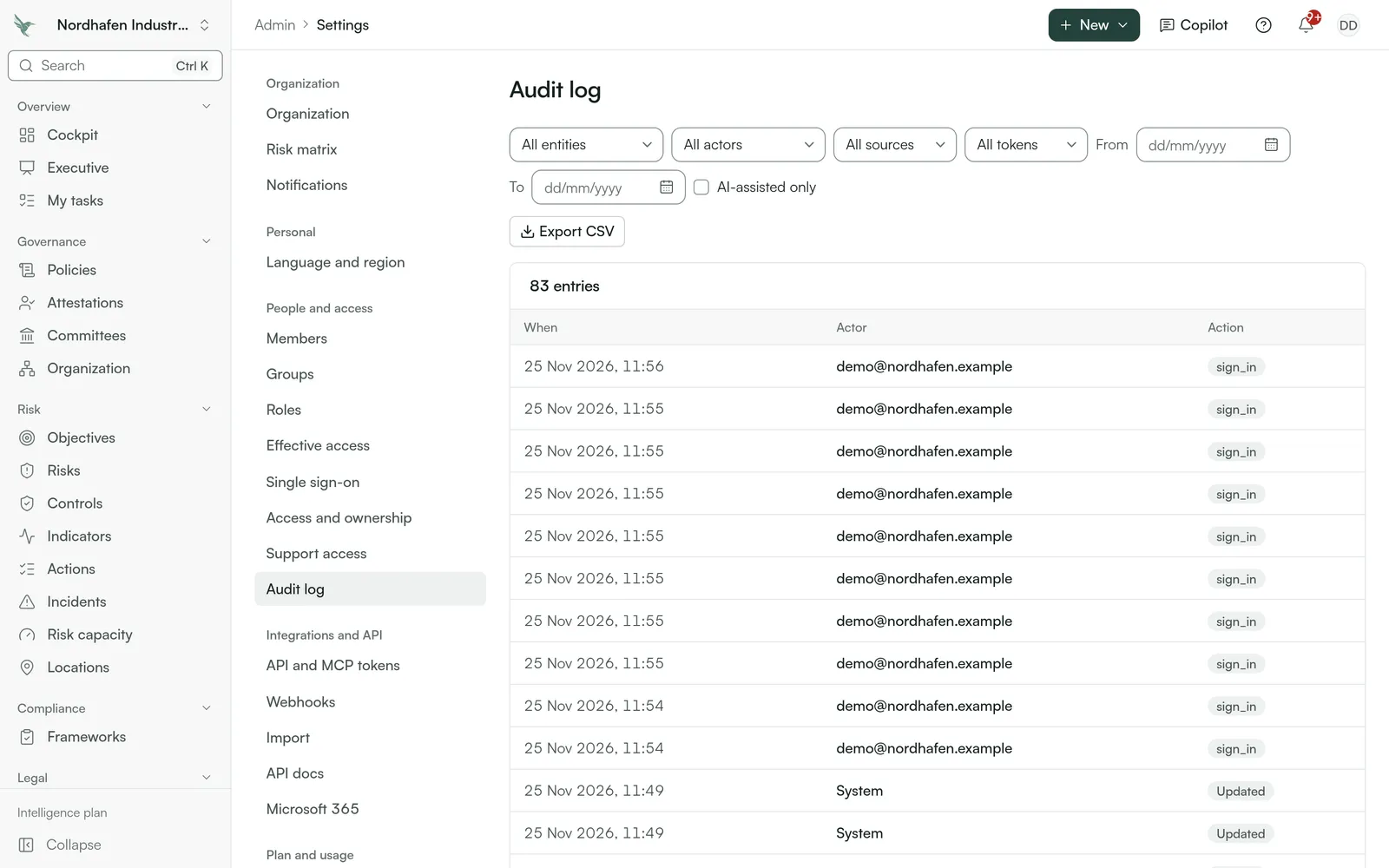
Open Settings and Audit log. Entries are listed newest first. The header counts the entries. The log shows the first 100; Load more adds 100 at a time, and there is no upper limit, so you can page back to the first entry.
| Column | What it shows |
|---|---|
| When | Date and time of the entry. |
| Actor | The person, or the automation or system, that acted. |
| Action | Created, Updated, Deleted, AI accepted or Exported. |
| Entity | The type of record, such as risk, contract or member. |
| Summary | A plain sentence, for example "Changed access of ...: role Viewer to Manager". |
| AI | AI-assisted when a person accepted an AI draft. |
Filter
Choose an Entity type to see one kind of record, for example risks or members.
Choose an Actor to see one person's activity.
Choose a Source to see only changes made through one channel, such as the app, the REST API, MCP or Volatilis Support (a read-only support view). Choose a Token to see only what one API token or connected AI app changed; revoked tokens stay in the list, marked "(revoked)". The export and GET /api/v1/audit-log take the same filter as the token query parameter (the token id).
Set From and To dates.
Tick AI-assisted only to see every change that came from an accepted AI draft: Copilot drafts, AI risk drafts and accepted agent proposals.
Select Clear filters to start over.
Export as CSV
Plan needed
People who may export the log (Admin, Manager and Auditor) select Export CSV. The export applies the filters you set and has time, actor, source, action, entity type, entity ID, summary and the AI-assisted flag, newest entries first. It is limited to 100,000 entries. If more match, the app asks: "More than 100,000 entries match. Narrow the date range or the filters to export." The export is also available through the REST API. It is itself recorded in the audit log.
What is recorded
- Creating, changing and deleting records in every module, in the app and through the REST API, MCP and imports.
- Access changes: invitations, roles, groups, scope, deactivation, removal, single sign-on and SCIM settings, access tokens and webhooks.
- Approvals and the acceptance of AI drafts.
- Exports of data and evidence.
- Plan changes and organization-level actions such as the deletion request.
An entry cannot be edited or removed in the app. The log is deleted only together with the organization, 7 days after you delete it.
Typical questions
| You want to know | Filter |
|---|---|
| Who gave Anna admin rights? | Entity type: member, then read the summaries. |
| What did the Copilot or an agent change this quarter? | AI-assisted only, with From and To. |
| Who exported evidence before the audit? | Read the Exported entries in the date range. |
| What happened to one risk? | Entity type: risk, then look for the risk code in the summaries. |