Billing and plans
See your plan, start an Intelligence trial, upgrade, and understand what happens when a limit is reached.
Volatilis GRC has three plans. Everyone can open Settings and Billing to see the plan and the usage meters. Only admins can change the plan.
The plans
| Plan | For | Price |
|---|---|---|
| Foundation | One shared system of record for the whole company: unlimited members and records, approvals, record history, MCP and a small AI allowance. | Free, with no time limit. |
| Intelligence | The platform reads, drafts and checks with you: AI allowances per member, agents, the organization's audit log and its export, SSO enforcement, SCIM, Entra group mapping, verified domains, custom roles and webhooks. | EUR 5 per member and month, excl. VAT. |
| Tailored | Built with you: custom features, contract terms and SLA, EU-only AI and larger AI allowances. | On request. Contact us. |
The exact limits of each plan are in Plans and limits.
Question tables have their own monthly meter, AI table cells this month. Foundation has none, so Run on a table opens the upgrade dialog. Intelligence includes 100 cells per member a month, pooled. Answers that come free from the cache, failed cells and contracts without document text do not use the meter.
Start an Intelligence trial
Role needed
An owner or admin starts the trial on purpose, with your real data or the sample company. No card is needed.
Open Settings and Billing. Under Upgrade to Intelligence, select Try Intelligence for 14 days. The same button is in the Plan limit reached dialog.
The page reloads on Intelligence. The sidebar and the billing page show how many days are left.
Each organization can start the trial once, and only if it never had Intelligence: an organization that paid for Intelligence before, or got it from Volatilis, cannot start a trial after cancelling. After that the button is gone, and a second start is refused, also through the API. The start is recorded in the audit log.
During the trial every member has Intelligence, with all its features. The AI allowances count at most 10 members, however many you have. Billing admins also see a small pill in the top bar, Intelligence trial: N days left, that opens the billing page; hover it for what happens after the trial. It turns amber for the last 3 days and reads Last day of Intelligence trial on the final day.
When the trial ends, nothing is deleted. AI features pause, and the organization's audit log, webhooks, SSO enforcement, SCIM provisioning, verified domains and custom roles stop working until you upgrade; SCIM can still deactivate and delete users. Everything you set up for them stays stored and works again after the upgrade. You can upgrade during the trial at any time; the paid plan then ends the trial.
Upgrade to Intelligence
Role needed
Open Settings and Billing. Under Upgrade to Intelligence you see the price per member and month and what Intelligence adds.
Select Upgrade to Intelligence.
If online payment is set up for your installation, you go to a secure checkout. The whole organization upgrades: you pay for your billed members, the current number of active members. Deactivated members, pending invitations and the people of the sample company are not counted. Billing is monthly. The price is net: VAT is added at checkout for your billing country. Businesses in other EU countries enter their VAT ID at checkout and are charged under reverse charge, so no VAT is added. Stripe sends the invoices, with VAT shown. After payment, the plan changes as soon as the payment is confirmed. The page says "Thank you."
If online payment is not set up, the button changes to Upgrade requested and the page says "We will contact you within one business day." Our team switches the plan after they have agreed the details with you.
If someone other than an admin opens the page, it says "Ask an admin to upgrade this organization."
The plan returns to Foundation when the subscription ends or stays unpaid. Nothing is deleted: records above the Foundation limits stay readable and new ones above a limit are refused. Every change is still recorded, but the organization's audit log is hidden again until you upgrade. Webhooks stop sending, SSO enforcement stops, SCIM can only deactivate and delete users (so people who leave still lose access), verified domains no longer let people join, and custom roles no longer give access. Their settings stay stored. If an organization is deleted, its subscription is cancelled.
Manage billing
Role needed
On an Intelligence plan paid online, the Current plan panel shows the renewal date, or "Cancels on <date>" when the subscription is set to end. Intelligence stays until that date, then the plan returns to Foundation and your data stays. Select Manage billing to open the secure customer portal: there you see invoices, change the payment method and cancel or resume the subscription. The portal returns you to the billing page.
The number of billed members follows your active members. The people of the sample company are not counted. When a person joins, is removed, or is deactivated or reactivated, in the app or by SCIM provisioning, the subscription is updated and Stripe charges or credits the difference for the rest of the period.
If a renewal payment fails, admins see a red notice on the billing page with Manage billing. Update the payment method there. Stripe retries the payment; when no retry is left, the plan returns to Foundation.
A Tailored plan is set by our team. Payment events never override it.
Read the meters
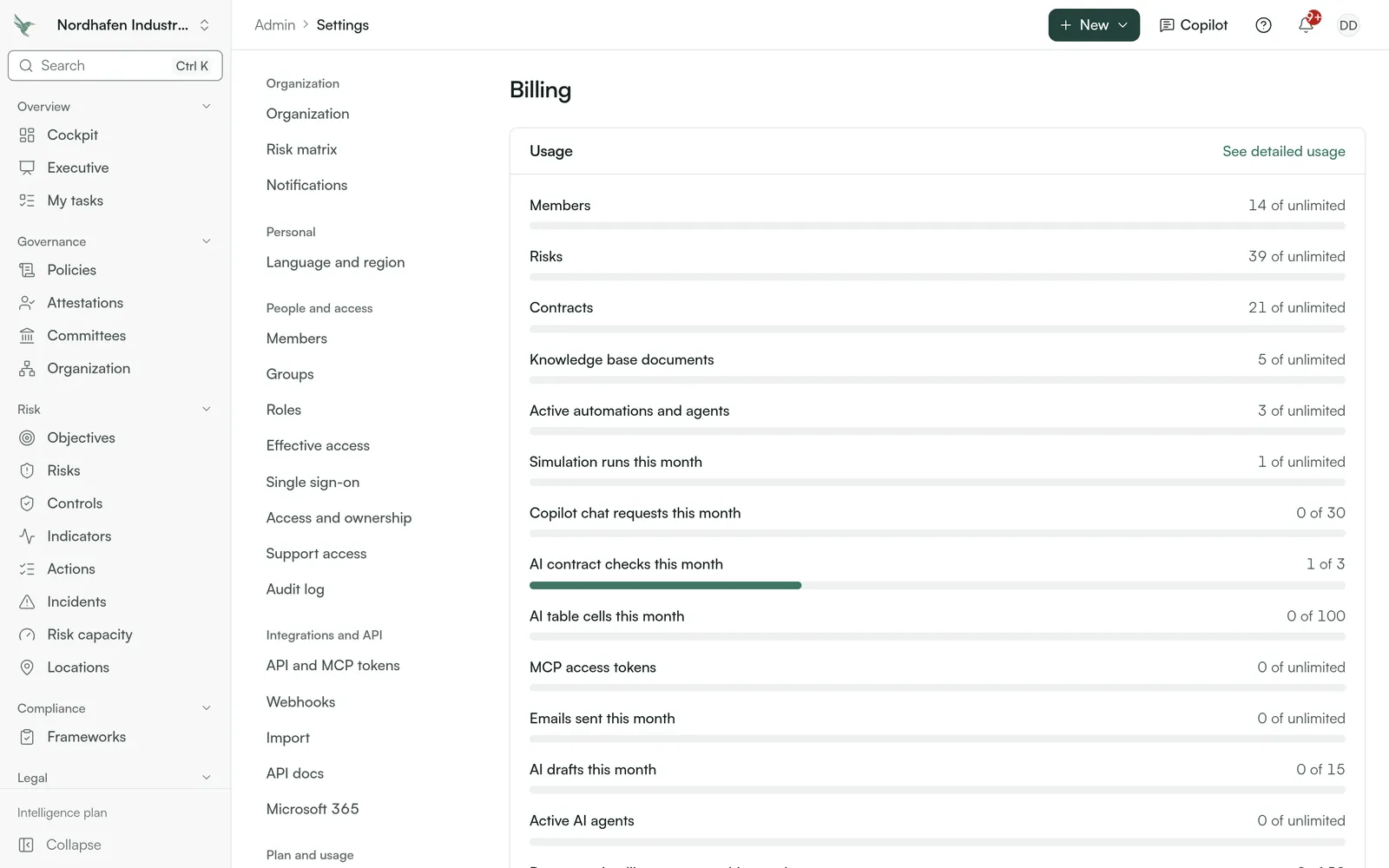
The Usage panel shows one bar per limit with "used of limit" and the word "unlimited" where there is no cap. Bars turn amber at 80 percent and red at 100 percent. Monthly meters reset on the 1st of each month. Count meters (active automations, tokens, storage) go down when you delete things. On Intelligence the AI meters show the pooled limit: the per-member amount times your billed members.
Select See detailed usage for the daily charts, the split by module and person, and the CSV export. See Usage and quotas.
What happens at a limit
- At 80 percent the admins get a notification once a month per limit. This notification kind is called Plan limits and can be switched off per channel in notification settings.
- At 100 percent the action is blocked. A dialog says Plan limit reached and names the limit.
- On Foundation it offers See plans, and admins of an organization that has not had its trial see Try Intelligence for 14 days. Only admins can change the plan.
- On Intelligence there are no add-on packs. A used-up AI allowance stops until the 1st of next month and everything else keeps working. The dialog and the error message say when it resets, and the dialog offers Talk to us about Tailored.
- Limits are checked on the server. They apply the same way in the app, the API and the Copilot.
When the Copilot quota runs low, the composer shows a meter with the requests left this month, and a link to the plans at zero.
What Intelligence adds
| Limit | Foundation | Intelligence | Tailored |
|---|---|---|---|
| Members | Unlimited | Unlimited | Unlimited |
| Risks | Unlimited | Unlimited | Unlimited |
| Contracts | Unlimited | Unlimited | Unlimited |
| Knowledge base documents | Unlimited | Unlimited | Unlimited |
| Active automations and agents | 10 | Unlimited | Unlimited |
| Simulation runs this month | 10 | Unlimited | Unlimited |
| Copilot chat requests this month | 10 | 30 per member, pooled | Unlimited |
| AI contract checks this month | 1 | 3 per member, pooled | Unlimited |
| AI table cells this month | 0 | 100 per member, pooled | Unlimited |
| MCP access tokens | 3 | Unlimited | Unlimited |
| Emails sent this month | 1,000 | Unlimited | Unlimited |
| AI drafts this month | 3 | 15 per member, pooled | Unlimited |
| Active AI agents | 0 | Unlimited | Unlimited |
| Document Intelligence pages this month | 20 | 50 per member, pooled | Unlimited |
| File storage | 2 GB | 100 GB | Unlimited |
| Automation runs this month | 1,000 | Unlimited | Unlimited |
| REST API calls this month | 1,000 | 50,000 | 1,000,000 |
| MCP tool calls this month | 1,000 | Unlimited | Unlimited |