Board and executives
What board members and executives see in Volatilis GRC: the executive cockpit, board reports, board papers and decisions.
Role needed
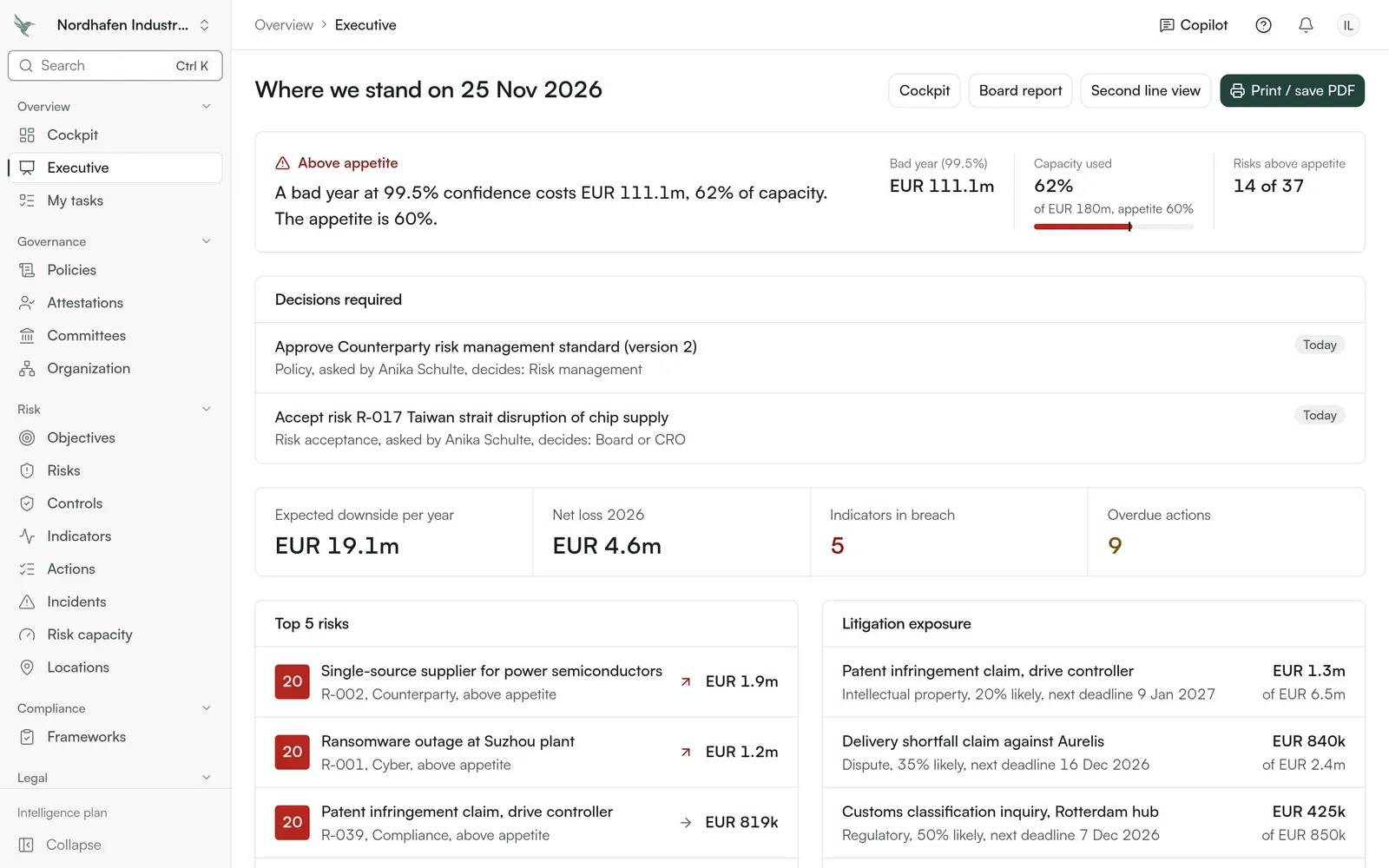
You answer two questions: are we within what we can carry, and what needs a decision from us. The app puts the answer on one screen and in a report that is prepared for you.
What you do
- Check the risk position against appetite and capacity.
- Read the board risk report before the meeting.
- Decide on board papers and record decisions.
- Follow the actions that come out of decisions.
You read. Second line colleagues prepare the content. The Viewer role is read only, with export of risks, controls and frameworks. The in-app sign-off of a board paper is an approval addressed to the approver set in the report settings (by default the admin role), so the board decision itself is taken in the meeting and recorded by the secretary.
Your pages
| Page | Use it to |
|---|---|
| Executive | One screen for the board and C-level. See Executive cockpit |
| Cockpit | Overview of your risk position |
| Reports | The board risk report and board papers |
| Committees | Meetings, minutes and decisions. See Committees and meetings |
| Risk capacity | Risk-bearing capacity and the simulation. See Capacity and appetite |
| My tasks | Your own items. Approval requests appear only when they are addressed to you |
Your routine
Before the meeting
Open the Executive page. It shows where you stand against appetite and capacity, with pending approvals and what needs a decision. You can choose it as your start page.
Read the board risk report
Open Reports and choose the board risk report. It covers capacity, top risks and changes, appetite, indicators, incidents, actions, compliance and the decisions required.
Decide
Board papers for one decision carry a recommendation and a proposed resolution. Decide in the meeting.
After the meeting
The secretary records decisions and can create actions from them. Follow them in Actions.
Your workflows
- Quarterly board risk report: how the report you read is made.
- Risk acceptance: when the board accepts a risk above appetite.
Your reports
| Report | Use |
|---|---|
| Board risk report | The quarterly report to the supervisory board and its audit committee |
| Board papers | One decision per paper: appetite renewal, risk acceptance, contract above signing authority, new policy |
| Year-end pack | Audit evidence for the year. It is visible to admins, managers and auditors, so ask your risk manager for it. See Year-end pack |